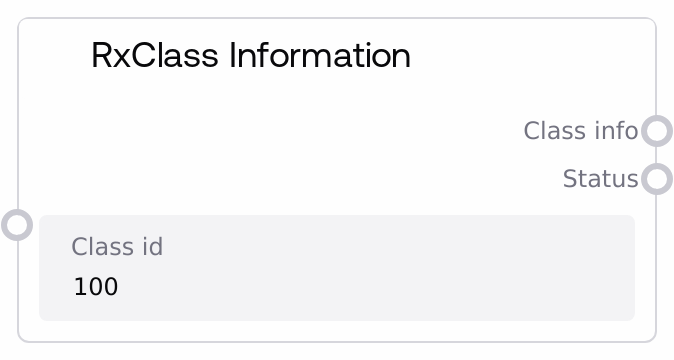
This node queries an RxNorm RxClass service for metadata about a specific drug class, given its class_id. It validates the input, calls the underlying RxNorm integration to fetch the class details, and wraps the response in a JSON structure that includes the requested class_id and the full data payload. Errors from the service or invalid input are returned as JSON along with a clear status string.
Usage
Use this node when you already know an RxClass identifier (class_id) and need authoritative details about that class (such as class name, class type, or related attributes) for reporting, analysis, or downstream processing. A common workflow is to first discover or confirm a class via a search node like "SaltAIRxClassSearch" (using a human-readable class name such as "ACE Inhibitors"), then pass the selected class_id into RxClass Information to obtain complete class metadata. Downstream, the JSON output can be parsed by custom logic nodes, visualization steps, or other Rx-related nodes such as "SaltAIRxClassMembers", "SaltAIRxClassByDrug", or "SaltAIRxClassDrugMembers" to enumerate or analyze drugs associated with that class. In larger pipelines, RxClass Information typically sits in the middle: upstream nodes derive or select a class, this node resolves detailed metadata, and downstream nodes use that metadata to filter patient cohorts, annotate clinical narratives, or feed analytic dashboards. For best results, keep the class_id in a consistent string form, capture and log the returned status for monitoring, and optionally persist the raw JSON output in a storage node if you want to avoid re-calling the external service for the same class multiple times.
| Field | Required | Type | Description | Example |
|---|
| class_id | True | STRING | RxClass identifier for the drug class you want information about. This is typically an alphanumeric identifier obtained from RxClass search results or from upstream drug classification steps. The string must not be empty or whitespace-only; if it is, the node returns an empty JSON object as class_info and a status message indicating that the Class ID cannot be empty. | D007398 |
Outputs
| Field | Type | Description | Example |
|---|
| class_info | STRING | A JSON-formatted string containing the requested RxClass metadata. The top-level structure wraps the raw RxClass payload inside an object that includes the original class_id and a data field. Downstream nodes should parse this JSON when they need to inspect specific attributes such as the class name, class type, or other RxClass-specific fields. | {"class_id": "D007398", "data": {"rxclassMinConceptItem": {"classId": "D007398", "className": "HMG-CoA reductase inhibitors", "classType": "ATC"}, "rxclassAttribute": [{"attrName": "TTY", "attrValue": "IN"}]}} |
| status | STRING | A human-readable status message indicating success or describing the error encountered. On success, it confirms that RxClass information was retrieved for the given class_id. On failure, it will contain validation messages (such as an empty Class ID) or propagated error information from the underlying RxClass service. | Successfully retrieved RxClass info for class ID D007398 |
Important Notes
- Performance: Each execution typically makes a live call to an external RxNorm RxClass service, so avoid unnecessary repeated calls for the same class_id; cache or persist the class_info JSON if you need to reuse it across multiple workflow steps.
- Limitations: If the provided class_id does not exist in RxClass or the external service is unavailable, the node returns an empty JSON object ("{}") for class_info and a status string describing the error instead of exposing low-level exceptions.
- Behavior: The node performs only minimal validation (checks for non-empty class_id) and does not normalize or transform the identifier; you are responsible for ensuring that the class_id is a valid RxClass identifier, typically obtained from nodes such as SaltAIRxClassSearch or SaltAIRxClassByDrug.
- Behavior: The outputs are always STRING types that contain JSON, not structured objects. Downstream consumers must explicitly parse the JSON to access nested fields like class name, type, or attributes, and should handle the possibility of missing or differently shaped fields depending on the RxClass response.
Troubleshooting
- Empty class_info with validation error: If class_info is "{}" and status reads "Error: Class ID cannot be empty", verify that your upstream node or manual configuration is actually passing a non-blank class_id string (no leading or trailing spaces and not an empty value).
- API Error message in status: If status includes text such as "API Error: ...", the underlying RxClass service returned an error (for example, due to an invalid class_id, connectivity problems, or service downtime). Confirm that the class_id is correct, implement retry logic or graceful fallback, and consider logging both status and class_id for diagnostics.
- Unexpected or sparse JSON structure: If downstream parsing fails or important fields are missing in class_info, first log or inspect the raw JSON string to see the exact structure returned by RxClass. Some classes may have fewer attributes, or the external API schema may evolve, so ensure your parsing logic checks for the presence of keys before accessing them.
- Downstream nodes not recognizing data: If subsequent nodes (such as custom analysis steps) fail when consuming class_info, make sure you are parsing the JSON and passing the correct nested pieces (for example, data.rxclassMinConceptItem.classId or className) rather than the entire JSON string where a single attribute is expected.