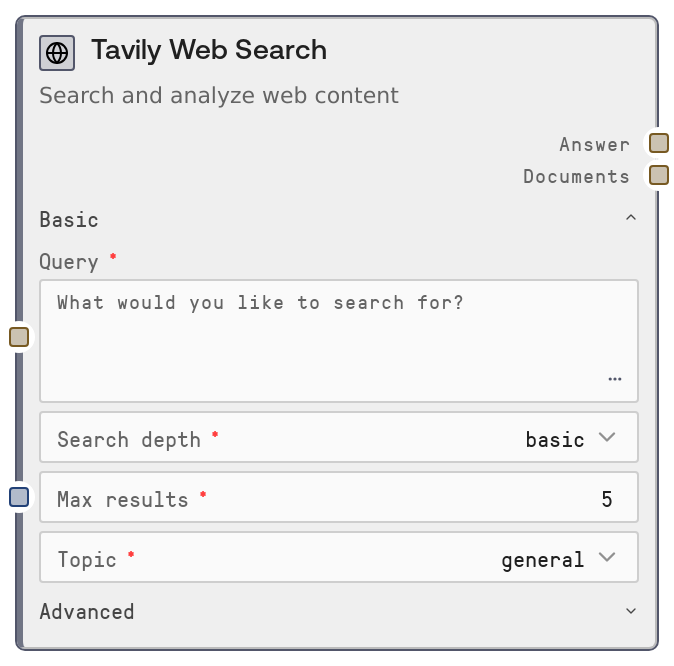
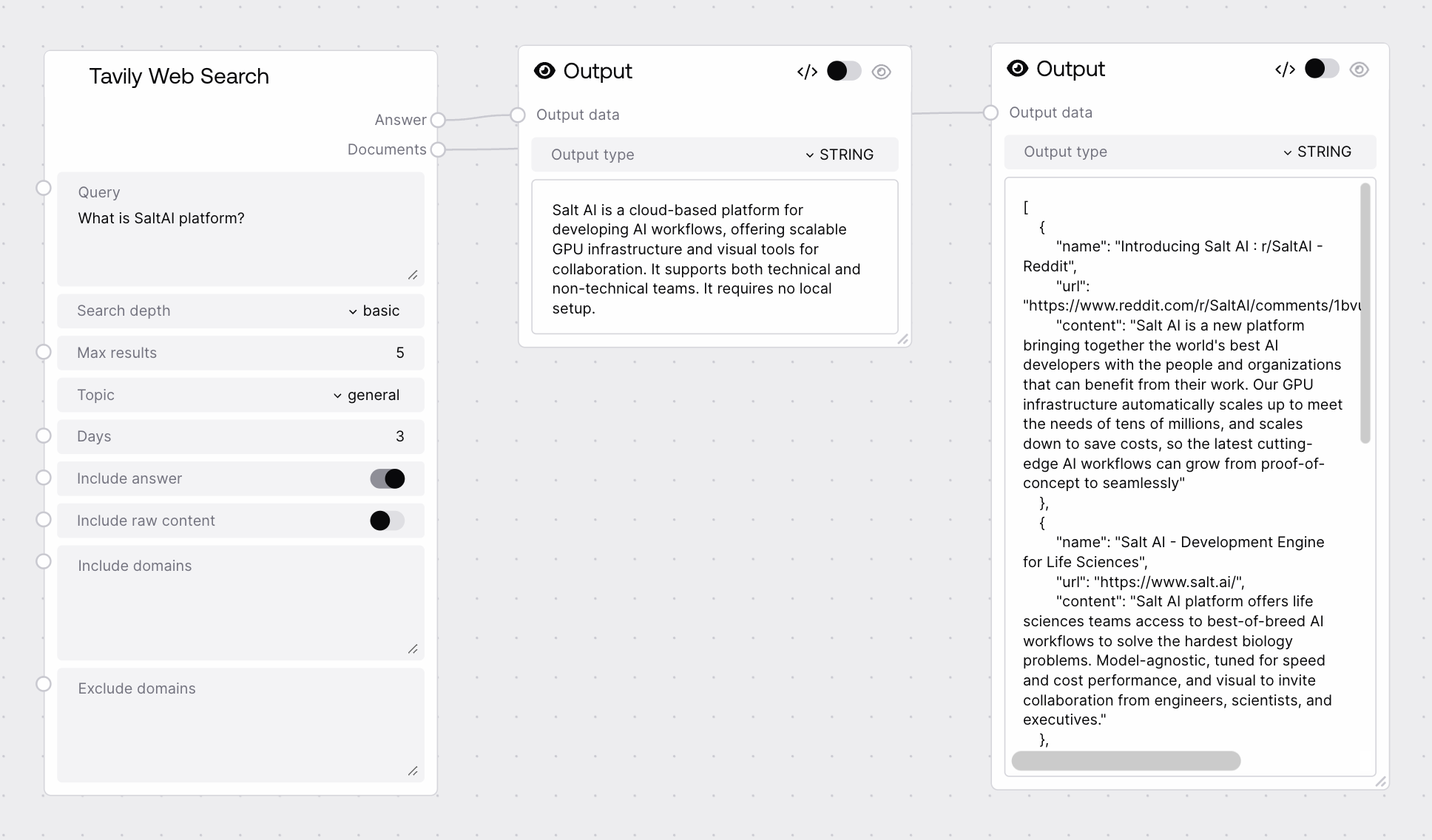
This node calls the Tavily web search endpoint through Salt’s web search agent base, letting you query the live web with configurable depth and filters. It can return both a short AI-generated answer to your query and a JSON string of structured search results, optionally including raw page content. It is designed for grounding reasoning, research, and retrieval workflows that need fresh, web-based information.
Use this node whenever your workflow needs up-to-date information from the public web or news, rather than relying only on static data. A common pattern is: receive a user question → build a clear query string → run Tavily Web Search → feed the documents output into downstream summarization, QA, or retrieval nodes, while optionally showing the answer directly to the end user. For research assistants, set search_depth to advanced when you need more comprehensive coverage and basic when you just need a quick scan. Use the topic = news plus days filter to implement "latest news about X over the past N days" flows. The include_domains and exclude_domains fields help you constrain sources (for example only financial news outlets, or excluding low-quality domains), which is especially useful in compliance, finance, or technical research pipelines. Typical upstream nodes include prompt builders or routing agents that craft the query, and typical downstream nodes include nodes for JSON parsing, ranking, summarization, or RAG-style answer generation using the returned documents JSON. It pairs naturally with other agent or LLM nodes that can read the answer for quick responses while using documents to justify or expand on the result.
The natural-language web search query you want Tavily to run. This can be a question, topic, or set of keywords. It should be clear and specific to retrieve focused results. Multiline is allowed; long, descriptive queries generally produce better context for the downstream LLMs.
What are the key differences between GPT-4.1 and GPT-4o for enterprise deployments?
search_depth
True
["basic", "advanced"]
Controls how deeply Tavily searches. "basic" is a lighter, cheaper search (1 credit) suited for quick lookups and simple questions. "advanced" performs a more thorough search (2 credits), better for complex research, comparison tasks, or when you need broader coverage and higher recall.
advanced
max_results
True
INT
The maximum number of search results Tavily should return. Must be at least 1; there is no explicit upper bound enforced here, but very high values may not be respected by the underlying service or may increase latency and cost. Use modest values (for example 5–10) for most QA or summarization workflows.
8
topic
True
["general", "news"]
Specifies the category of search. "general" performs a broad web search across all types of content. "news" focuses the search on news-style sources and enables the `days` filter to restrict results to recent coverage.
news
days
True
INT
Only effective when `topic` is set to `news`. Represents how many days back from the current date Tavily should consider when returning news results. Use small values (for example 1–7) for breaking news and larger values for trend analysis.
3
include_answer
True
BOOLEAN
If true, Tavily returns a concise AI-generated answer to the original query alongside the raw documents. Enable this when you want a fast, human-readable summary without additional LLM steps; disable it when you only need the source documents for your own custom reasoning or QA pipeline.
True
include_raw_content
True
BOOLEAN
If true, the returned documents will include the raw text content of each result. When false, Tavily returns only the most query-related extracted content. Turning this on is useful for deep analysis or custom parsing, but increases payload size and processing time.
False
include_domains
False
STRING
Optional newline-separated list of domains that Tavily should prioritize or restrict results to. Use this to limit searches to trusted or domain-specific sources, such as official documentation or specific news outlets. Leave empty for unconstrained domain selection.
openai.com arxiv.org huggingface.co
exclude_domains
False
STRING
Optional newline-separated list of domains to exclude from the search results. This is useful to avoid low-quality sites, duplicates, or your own application’s hostname if you do not want self-referential results.
A short, human-readable answer to the input query, generated by the Tavily service based on the retrieved web results. This is typically a concise paragraph or two. It is especially useful when you want to display an immediate response to users without adding an extra LLM summarization step.
GPT-4.1 offers improved reasoning reliability and better tool integration compared to GPT-4o, but GPT-4o is optimized for multimodal, low-latency use cases. For enterprise deployments that prioritize structured reasoning and complex workflows, GPT-4.1 is often preferred, while GPT-4o is ideal for interactive assistants that must handle text, vision, and audio in real time.
documents
STRING
A JSON-encoded string containing the structured search results returned by Tavily. Each item typically includes fields like title, URL, snippet, and optionally raw content, plus any relevance or metadata Tavily provides. Downstream nodes should parse this JSON string to work with results programmatically, for example for ranking, filtering, or summarizing.
[{"title": "OpenAI Model Spec: GPT-4.1 vs GPT-4o", "url": "https://openai.com/models/gpt-4-1", "snippet": "GPT-4.1 provides higher reliability and improved tool calling compared to GPT-4o...", "content": "Full page text if include_raw_content was true..."}, {"title": "Enterprise guide to choosing between GPT-4.1 and GPT-4o", "url": "https://enterprise-ml.example.com/gpt4-comparison", "snippet": "When selecting a model for enterprise workloads, consider latency, cost, and reasoning depth..."}]
Performance: "advanced" search depth typically incurs higher latency and cost than "basic" because it performs a more extensive search and aggregation of results.
Performance: Enabling include_raw_content can significantly increase payload size and downstream processing time; prefer it only when you truly need full-page text.
Limitations: The days filter only applies when topic is set to news; for general searches, time-based restriction is not enforced via this parameter.
Limitations: The Tavily service may not always honor very large max_results values or extremely restrictive domain filters if they conflict with its internal constraints.
Behavior: include_answer controls whether an AI-written summary is returned; if disabled, the answer output may be empty or minimal while documents remains fully populated.
Behavior: Both outputs are plain strings; workflows that need structured access to fields like URL or snippet must parse the documents JSON before further processing.
No or very few results returned: If the documents JSON contains an empty list or only one result, try broadening the query, increasing max_results, or removing restrictive include_domains or exclude_domains filters.
Answer is empty or unhelpful: Ensure include_answer is set to true and that your query is a clear, self-contained question. Overly vague or purely keyword-based queries can lead to generic answers.
Unexpected old articles when using news topic: Confirm that topic is set to news and that days is a small integer, such as 1–7. If you still see older results, refine the query to mention recency, such as adding "in 2025" or "this week".
Downstream JSON parsing errors: The documents output is a JSON string. Make sure your downstream node or code parses it as JSON before iterating; treat it as text only if you intend to display it directly.