MySQL Test Connection
Usage
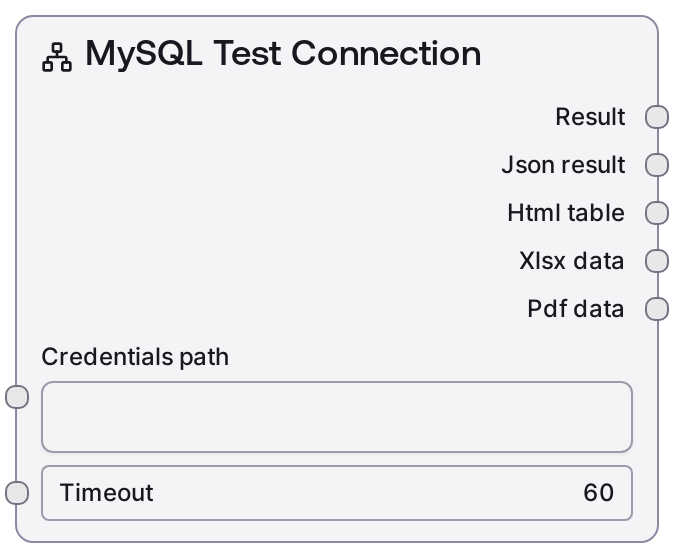
Use the MySQL Test Connection node early in any workflow that needs MySQL access, before query, schema, or export nodes. Connect it to the same credentials source that downstream MySQL nodes will use so you are testing the exact configuration your queries depend on. A typical pattern is: (1) load or construct credentials (for example using a secret store or a MySQL Connection String node), (2) pass the credentials_path and a reasonable timeout (e.g., 10–30 seconds) into MySQL Test Connection, (3) inspect the text_result or json_result, and (4) only if the test succeeded, proceed to nodes like MySQL Query, MySQL Execute, MySQL List Tables, MySQL Visual Query Builder, or MySQL Query Builder Helper. It is especially useful in scheduled jobs, environment onboarding, or incident triage flows where you want to separate connectivity issues from SQL or schema problems.
Inputs
| Field | Required | Type | Description | Example |
|---|---|---|---|---|
| credentials_path | True | STRING | Path or key where the MySQL credentials are stored in Salt's credential system. The underlying credentials must match the "mysql" credential template and typically include host, port, username, password, and optionally a default database. If this path is incorrect or points to an incomplete credential set, the connection test will fail. | secrets/environments/prod/mysql_primary |
| timeout | True | INT | Maximum time in seconds to wait for the MySQL connection test request to complete. Too low may produce timeouts on slow or distant networks; too high may slow down failure handling in workflows that run frequently. | 15 |
Outputs
| Field | Type | Description | Example |
|---|---|---|---|
| text_result | STRING | Human-readable summary of the connection test, suitable for logs, notifications, or quick inspection in the UI. It typically states whether the connection succeeded and may include basic diagnostic information such as host, database, and latency. | MySQL Connection Test: SUCCESS Connected to mysql-primary:3306 using database 'analytics' (latency 120 ms). |
| json_result | STRING | JSON-encoded string containing the raw result returned by the MySQL test-connection service. Downstream nodes or custom logic can parse this to branch on status, detailed error codes, or diagnostic fields. | {"status":"success","message":"Connection established","host":"mysql-primary","port":3306,"database":"analytics","latency_ms":120} |
| html_result | STRING | HTML representation of the result if produced by the base node's default formatter. This is useful for dashboards or UI panels that render a rich status view. In some workflows this may be left empty. | MySQL Connection TestStatus: SUCCESS Host: mysql-primary:3306 Database: analytics Latency: 120 ms |
| xlsx_result | BYTES | Binary XLSX data when the default formatter emits spreadsheet output. For a simple connection test this is often empty or unused, but the slot is available for consistency with other database nodes in reporting workflows. | |
| pdf_result | BYTES | Binary PDF data when the default formatter emits a PDF summary. In many cases for connectivity checks this will be empty, but it can be used in audit or reporting pipelines that archive test results as documents. |
Important Notes
- Performance: While the operation is lightweight, total duration still depends on network latency and server responsiveness; set the timeout high enough for your environment but low enough that failing tests do not block long-running workflows.
- Limitations: A successful test only confirms that a connection can be established with the provided credentials; it does not validate that the user has specific permissions for queries, DML operations, or schema changes.
- Behavior: The node relies on the "mysql" credential template and the credentials_path; if those credentials change, you must ensure the stored secret is updated, otherwise the node will continue to test against outdated connection details.
- Behavior: The structure and content of json_result mirror the upstream MySQL test-connection service; different environments or versions may expose additional fields, so downstream parsing should be resilient to extra or missing keys.
Troubleshooting
- Common Error 1: Message indicates authentication failure (for example, access denied) – Verify that the username and password in the credential at credentials_path are correct and that the MySQL user has permission to connect from the Salt environment's host.
- Common Error 2: Timeout reached while calling test-connection – Increase the timeout value, check for firewalls or network ACLs blocking traffic, confirm that the MySQL instance is up, and test connectivity from the same network using a standard MySQL client.
- Common Error 3: Error about loading credentials from the specified path – Confirm that the credentials_path is spelled correctly, that the secret exists in your environment, and that the Salt workflow has permission to read it; update the path or create the missing credential if necessary.
- Common Error 4: json_result does not contain an expected field like status – The upstream service may be returning an error payload or a different schema; inspect text_result and json_result directly, adjust error handling, and avoid hard assumptions about the presence of optional fields.