Neo4J Relationships by Type
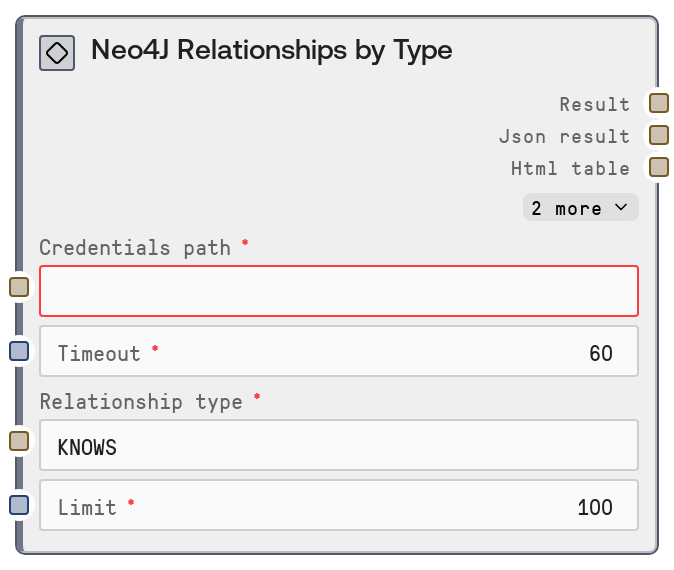
This node queries a Neo4J database for relationships that match a given relationship type (e.g., KNOWS, WORKS_WITH), with an optional limit on the number of results. It uses stored Neo4J credentials, calls a remote Neo4J data connector endpoint, and returns a human-readable text summary alongside the full JSON response. This is useful for exploring graph structures, validating schema usage, and feeding relationship data into downstream analysis or visualization steps.
Usage
Use this node when you need to inspect or work with a subset of relationships from your Neo4J graph based on their type, such as analyzing social connections, organizational hierarchies, or dependency links. It typically appears after a credentials or connection setup node (for example, a Neo4J Test Connection node) and often after a discovery node like "Neo4J Relationship Types" so you know which relationship types are available. Upstream, you usually rely on platform-managed credentials and timeout settings. Downstream, connect its outputs to nodes that parse JSON, perform analytics, generate reports, or build visual graph representations—often together with "Neo4J Nodes by Label" or "Neo4J Graph Explorer" for a more complete view. A common pattern is: (1) use "Neo4J Relationship Types" to list available types, (2) select a specific type and call "Neo4J Relationships by Type", then (3) pass the JSON output into a custom analysis or visualization node. For best results, keep the limit modest during initial exploration to avoid large payloads, and then increase it in production flows once you’ve validated performance and data shape.
| Field | Required | Type | Description | Example |
|---|
| timeout | True | INT | Maximum time in seconds to wait for the Neo4J connector request to complete before failing. Use higher values for complex graphs or large result sets, but keep it reasonable to avoid blocking workflows. | 30 |
| relationship_type | True | STRING | The Neo4J relationship type to filter by, matching the type used in your graph schema (for example, KNOWS, FOLLOWS, WORKS_WITH). Must correspond to an existing relationship type; otherwise, the query may return an empty result set. | KNOWS |
| limit | True | INT | Maximum number of relationships to return. Must be an integer between 1 and 10000. This helps protect performance and avoid overly large responses when the selected relationship type is very common. | 250 |
Outputs
| Field | Type | Description | Example |
|---|
| text | STRING | A human-readable summary of the relationships fetched, typically including the relationship type, count, and possibly a brief description of the result set. Designed for quick inspection or piping into text-focused nodes. | Neo4J Relationships by Type: KNOWS — retrieved 250 relationships connecting Person nodes. |
| json | STRING | Raw JSON payload returned by the Neo4J connector for relationships matching the specified type. This usually contains an array of relationship records, each with IDs, start and end node references, type, and properties. Use this for downstream parsing, analytics, or visualization. | {"relationships": [{"id": 1024, "type": "KNOWS", "startNodeId": 17, "endNodeId": 42, "properties": {"since": 2019}}, {"id": 1025, "type": "KNOWS", "startNodeId": 18, "endNodeId": 33, "properties": {"since": 2021}}], "count": 2} |
| error | STRING | Error message string if the request fails or the connector returns an error. Empty when the operation succeeds. Useful for conditional branching and debugging in workflows. | Failed to fetch relationships: connection timeout after 30 seconds |
| meta | STRING | Additional metadata in JSON-encoded form, such as timing information, request parameters, or connector-side diagnostics. Format may vary and is intended for advanced inspection or logging. | {"request": {"endpoint": "/relationships-by-type", "relationship_type": "KNOWS", "limit": 250}, "duration_ms": 184, "status": "success"} |
Important Notes
- Performance: The
limit parameter is capped between 1 and 10000; fetching very large limits on dense graphs can still produce large JSON payloads, so start with smaller values during exploration.
- Limitations: If the specified
relationship_type does not exist in the database, the node will not error but will typically return an empty result set, which can be mistaken for a connection issue.
- Behavior: Credentials are resolved via
credentials_path and the neo4j credential template; misconfigured or missing secrets will cause the node to return an error string instead of relationship data.
- Behavior: The node sends requests to a Neo4J data connector endpoint ("/relationships-by-type") rather than connecting directly to Neo4J from the workflow, so network or connector outages will surface as remote service errors.
Troubleshooting
- No relationships returned: If you see a valid summary but zero relationships, confirm that the
relationship_type string exactly matches an existing type (case and spelling). Use the "Neo4J Relationship Types" node first to list valid values.
- Timeout errors: If you encounter messages like "connection timeout" or similar in the
error output, increase the timeout value or decrease the limit so the connector can respond within the allotted time.
- Authentication or credential errors: Messages mentioning authentication failure or credentials usually mean the
credentials_path points to missing or invalid Neo4J credentials. Update the stored neo4j secret and re-test with the "Neo4J Test Connection" node.
- Malformed JSON downstream: If downstream nodes fail to parse the
json output, verify that you are treating it as a JSON string and, where required, explicitly parse it into a structured object before further processing.