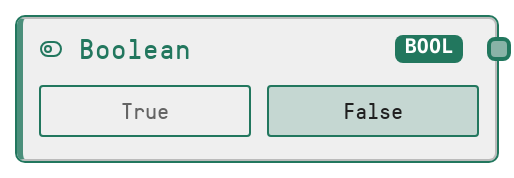
Boolean
This node produces a literal boolean value that you can toggle directly on the canvas. It is typically used to drive conditional logic or to enable or disable behavior in downstream nodes. The value is preserved as a strict boolean type and passed unchanged through the workflow.
Usage
Use this node whenever you need a simple true or false flag to control the flow or configuration of your pipeline. Common scenarios include feeding it into conditional nodes (such as If/Else or loop controllers) to decide which branch to execute, toggling optional behaviors on downstream nodes (for example, enabling logging or debug outputs), or acting as a global feature flag. It is usually placed near the start of a workflow or next to the logic it controls so that its effect is visually clear. Upstream, it typically has no inputs because you set the value manually. Downstream, it connects to any input that expects a BOOLEAN, such as condition inputs on logic or control nodes, or boolean configuration parameters on model, API, or tool nodes. As a best practice, give the node a descriptive title like "Use backup model?" or "Enable strict mode" so the meaning of the toggle is obvious when revisiting or sharing the workflow.
| Field | Required | Type | Description | Example |
|---|
| value | True | BOOLEAN | The literal boolean value this node will output. Set via a toggle in the UI with labels "True" and "False". Defaults to false if not changed. Must be a boolean value; other types provided programmatically are coerced to their boolean equivalent. | True |
Outputs
| Field | Type | Description | Example |
|---|
| value | BOOLEAN | The evaluated boolean flag that downstream nodes receive. This is a single true or false value that can be wired into any BOOLEAN input, such as a condition on a branching node or an "enabled" flag on a tool or model node. | False |
Important Notes
- Performance: The node has negligible performance cost because it only passes through a boolean literal and does not call external services or models
- Limitations: It cannot compute conditions dynamically by itself. For data-driven decisions, pair it with comparison or logic nodes that operate on runtime data
- Behavior: If no value is specified, it defaults to false. This can unintentionally disable logic if you forget to flip the toggle when designing the workflow
- Behavior: Any non-boolean values passed programmatically into this node are converted to a boolean, which may hide errors if you expect strict type checking on inputs
Troubleshooting
- Downstream condition never triggers: If a branch controlled by this node never runs, confirm that the Boolean node is set to true and connected to the correct condition input on the conditional node
- Unexpected default behavior where a feature seems off: This is often due to leaving the node at its default false value. Open the node and set the value to true where the feature should be enabled
- Type mismatch on downstream node: If a downstream node reports that it expected a BOOLEAN but received another type, verify the wiring and ensure the Boolean node’s output is connected directly to the BOOLEAN input, without passing through nodes that change the data type