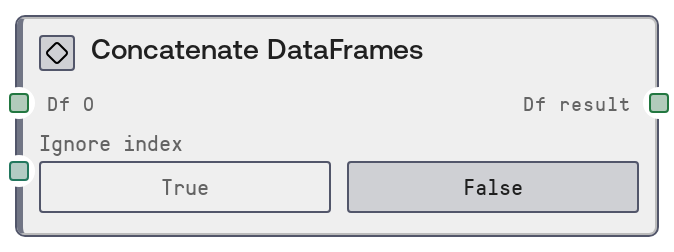
Concatenate DataFrames
This node concatenates multiple tabular DataFrames by stacking their rows on top of each other. It behaves like a SQL UNION ALL operation, preserving all rows from each input DataFrame. You can optionally reset to a clean 0-based integer index across the combined result.
Usage
Use this node when you need to merge multiple, similarly structured tables into one longer table. Common scenarios include combining batched exports (for example, monthly logs into a yearly log), aggregating results from repeated experiments, or assembling partitioned datasets after preprocessing. Place Concatenate DataFrames after any nodes that produce compatible DataFrame schemas, such as CSV-to-DataFrame loaders, query or result nodes, or transformation and cleaning nodes that standardize column names and types. Connect the first DataFrame to df_0; as you connect df_1, df_2, and so on, additional optional inputs become visible, allowing you to chain up to ten DataFrames (df_0 through df_9). Toggle ignore_index to control how the resulting index behaves. When set to true, the node rebuilds the index from 0 to N-1, which is recommended when the source DataFrames share overlapping index values or when you do not care about preserving original indices. Downstream nodes such as DataFrameToHTMLNode, plotting or visualization nodes, or feature engineering nodes can then consume the combined df_result as a single table. For side-by-side merging by key columns instead of stacking rows, use a join or merge-style node instead of Concatenate DataFrames.
| Field | Required | Type | Description | Example |
|---|
| df_0 | True | DATAFRAME | The first and only mandatory input DataFrame to include in the concatenation. This defines the baseline schema (columns) that additional DataFrames should match for a clean vertical stack. Columns that are missing in some inputs will be filled with nulls for those rows. | A DataFrame with columns ['sample_id', 'timepoint', 'gene_symbol', 'expression_value'] representing RNA-seq measurements for one sequencing batch. |
| ignore_index | True | BOOLEAN | Whether to reset and ignore the original row indices from all input DataFrames. If true, the output index is a fresh 0..N-1 integer index across the concatenated result. If false, original indices are preserved, which may lead to duplicate index values when inputs overlap. | true |
Outputs
| Field | Type | Description | Example |
|---|
| df_result | DATAFRAME | The concatenated DataFrame containing all rows from df_0 through any provided df_1 to df_9, stacked vertically in the order they were connected. Columns are the union of all input columns; any column absent in some inputs will have missing values for those rows. The index is either preserved from inputs, if ignore_index is false, or reset to a new continuous integer index if ignore_index is true. | A DataFrame with 50000 rows and columns ['sample_id', 'timepoint', 'gene_symbol', 'expression_value'] created by stacking five 10000-row batch DataFrames, with a 0 to 49999 integer index when ignore_index is true. |
Important Notes
- Performance: Concatenating many large DataFrames can be memory-intensive because all inputs must be held in memory alongside the combined result. Consider preprocessing, filtering, or chunking upstream when working with very large tables.
- Limitations: The node supports at most ten DataFrames (df_0 through df_9). If you need to combine more, chain multiple Concatenate DataFrames nodes, for example first combine groups, then combine the group results.
- Behavior: Columns are unified across all inputs. If a column exists only in some DataFrames, it will be created in others with null values. This can silently widen the schema if there are inconsistent column names.
- Behavior: When ignore_index is false, row index values from different DataFrames are preserved, which can produce duplicate indices. Downstream nodes that rely on unique indices may behave unexpectedly in this case.
- Best practice: Standardize column names, data types, and ordering upstream, for example via a schema-alignment or rename-columns node, to avoid subtle bugs from unintended column mismatches or type coercions during concatenation.
Troubleshooting
- Unexpected extra columns after concatenation: If df_result has more columns than any single input, some DataFrames likely have slightly different column names, such as 'gene' versus 'gene_symbol'. Harmonize column names upstream before using this node.
- Many null values in some columns after concatenation: This usually occurs when certain columns are missing in some input DataFrames. Check schemas of each df_* and ensure required columns exist everywhere, or explicitly fill default values before concatenation.
- MemoryError or significant slowdown during execution: The combined DataFrame may be too large for available memory. Reduce input size by filtering rows or columns, concatenate in stages and persist intermediate results, or drop unnecessary columns before using this node.
- Unexpected or duplicate indices in the output: If you see duplicated or non-continuous indices in df_result, either enable ignore_index to reset the index or explicitly reset_index on upstream DataFrames before concatenation.