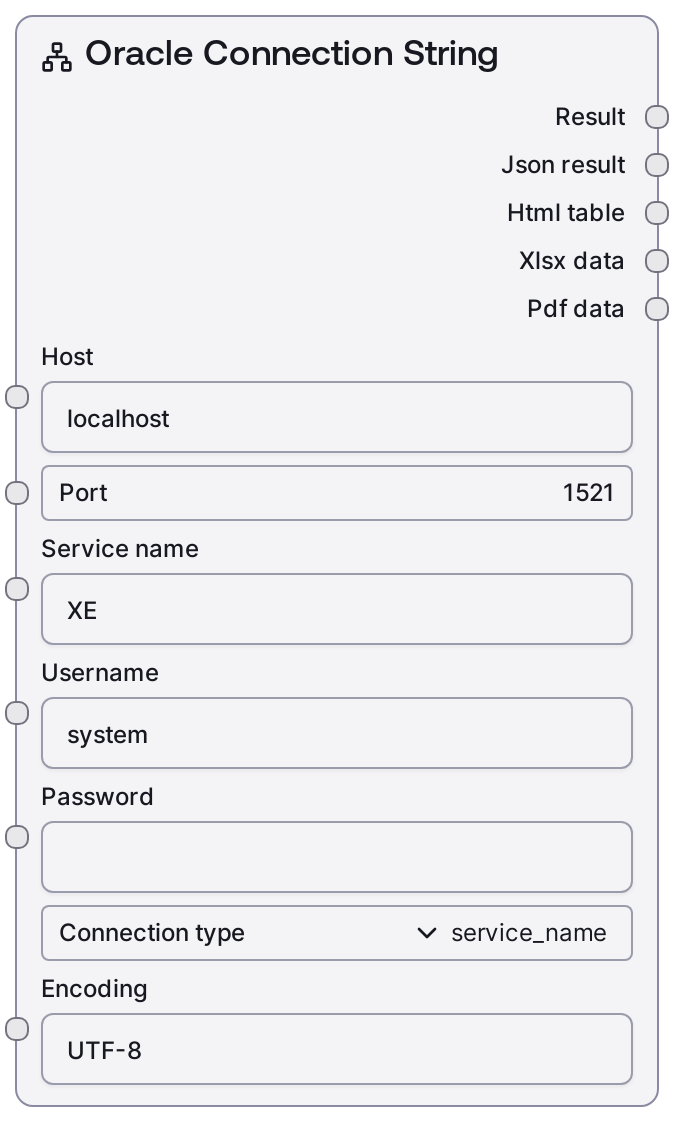
Oracle Connection String
This node constructs a properly formatted Oracle database connection string from discrete parameters such as host, port, service name or SID, username, password, and encoding. It supports both service name–based and SID-based connection styles via the connection_type selector. The resulting URI can be passed directly to other Oracle-related nodes or any component that accepts an Oracle connection string.
Usage
Use this node whenever you need a reusable Oracle connection URI instead of manually typing or hard-coding one. Typical workflows place it early in a database pipeline: first configure basic connection details (host, port, service name or SID), supply credentials, choose connection_type, and optionally adjust encoding; then feed the resulting connection string into downstream Oracle operation nodes such as SaltOracleQuery, SaltOracleExecute, SaltOracleListSchemas, or SaltOracleDatabaseInfo. This is especially useful when orchestrating multiple database actions that should share the same connection, or when you want environment-specific details (dev/stage/prod) controlled at a single point. Combine it with credential-loading or environment-configuration nodes upstream, and with query/DDL/metadata nodes downstream. Best practice is to keep the password managed via Salt’s secure credential handling and only pass the constructed URI to nodes that actually need to establish a database session.
| Field | Required | Type | Description | Example |
|---|
| host | True | STRING | Hostname or IP address of the Oracle database server. Must be reachable from the runtime environment; use DNS name or IPv4/IPv6 literal. | db-oracle-prod.internal.company.com |
| port | True | INT | TCP port on which the Oracle listener is exposed. Must be between 1 and 65535; 1521 is the conventional default. | 1521 |
| service_name | True | STRING | Oracle service name or SID, depending on connection_type. For connection_type="service_name" supply the service name; for "sid" supply the SID string. | ORCLPDB1 |
| username | True | STRING | Oracle database user to authenticate as. The user must exist and have the privileges required by downstream operations. | reporting_user |
| password | True | PASSWORD | Password for the specified Oracle user. Handled as a sensitive value; do not hard-code secrets in workflows. | |
| connection_type | True | ["service_name", "sid"] | Chooses whether the connection string targets an Oracle service name or a SID. Use "service_name" for modern configurations, "sid" for legacy/SID-based setups. | service_name |
| encoding | True | STRING | Optional character encoding to include in the connection settings. Typically "UTF-8"; change only if your Oracle instance uses a different charset. | UTF-8 |
Outputs
| Field | Type | Description | Example |
|---|
| connection_string | STRING | The fully constructed Oracle database connection URI built from the provided parameters. This string can be fed directly into other Oracle nodes or any client library configuration input that accepts an Oracle connection string. | User Id=reporting_user;Password=;Server=db-oracle-prod.internal.company.com;Port=1521;Service Name=ORCLPDB1;Charset=UTF-8; |
Important Notes
- Performance: The node only formats a string and performs no network I/O, so it is effectively instantaneous and adds negligible overhead to workflows.
- Limitations: It assumes a standard Oracle connection style and may not cover highly customized listener configurations, proxy users, or advanced security options (e.g., wallets, SSL certificates) out of the box.
- Behavior: The meaning of the service_name field changes with connection_type; using a SID value while connection_type is set to "service_name" (or vice versa) will yield a syntactically valid but non-working URI.
- Behavior: Passwords are treated as sensitive inputs; avoid logging or exposing the produced connection string in debug outputs if it embeds credentials in plain text.
Troubleshooting
- Connection refused or timeout: If downstream Oracle nodes report connection failures, verify host and port reachability from the Salt runtime environment and ensure the listener is running on the specified port.
- ORA-12514 or service not registered: This usually indicates an incorrect service_name or SID; double-check the value against the Oracle instance configuration and ensure connection_type matches how your database is configured.
- Authentication failed (ORA-01017): Confirm username and password are correct and that the user is allowed to connect to the specified service/SID; update the password input if credentials have recently changed.
- Encoding issues (garbled characters): If you see corrupted text when reading non-ASCII data via downstream nodes, verify that encoding matches your Oracle database character set (for example, use "AL32UTF8" instead of plain "UTF-8" if required).