RxNorm Drugs by Class
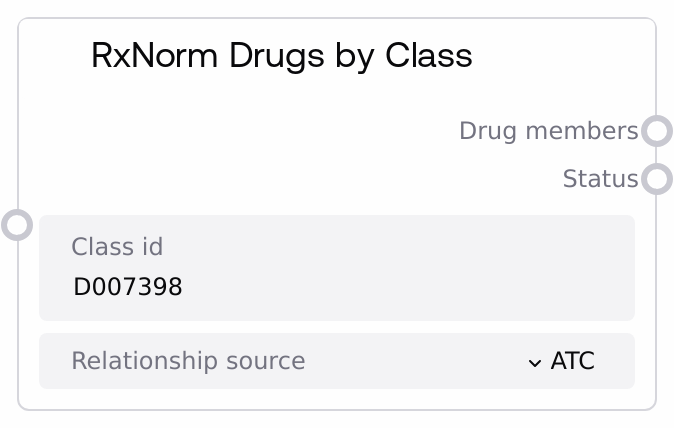
This node calls the RxClass/RxNorm service to list all RxNorm drug concepts associated with a specified drug class identifier, limited to a chosen relationship source (e.g., ATC or VA). It validates the class_id, invokes the remote API, and returns a formatted JSON string containing the class_id, relationship_source, and the full drug member payload, along with a status message. Use it to expand abstract drug classes into concrete RxNorm drug concepts for downstream analysis or reporting.
Usage
Use this node when you know a drug class identifier and need the set of RxNorm drugs that belong to that class according to a specific classification source. A typical workflow: first, discover or confirm the class using nodes like "SaltAIRxClassSearch" or "SaltAIRxClassInfo"; then pass the resulting class_id into this node, selecting a relationship_source such as "ATC" or "VA". The returned drug_members JSON can then be parsed by downstream nodes to extract RxCUIs and drug names for cohort building, formulary analysis, or quality measures. In pipelines focused on population medication analysis, place this node after any class-selection logic (including nodes like "SaltAIDrugClassAnalysis" or "SaltAIRxClassMembers" if you need more context) and before custom nodes that join the resulting RxCUIs to claims or EHR medication tables.
| Field | Required | Type | Description | Example |
|---|
| class_id | True | STRING | The RxClass identifier for the drug class whose member drugs you want. It must be a non-empty string; if blank or only whitespace, the node returns an error without contacting the service. This should be an ID recognized by the RxClass system for the selected relationship_source (for example, a MeSH- or ATC-derived class ID that RxClass can resolve). | D007398 |
| relationship_source | True | CHOICE | The terminology or classification system that defines how class membership is determined. Must be one of: ATC, ATCPROD, CDC, DAILYMED, FDASPL, FMTSME, MEDRT, RXNORM, SNOMEDCT, VA. Different sources can yield different member sets for the same class_id, so choose the one that matches your clinical, regulatory, or analytic context. | ATC |
Outputs
| Field | Type | Description | Example |
|---|
| drug_members | STRING | A JSON-formatted string containing the result of the RxClass query. The top-level object includes at least class_id, relationship_source, and drug_members, where drug_members is the raw payload from the RxClass/RxNorm API for that class and relationship source. Downstream nodes should parse this JSON to access drugMemberGroup.drugMember entries, extract RxCUIs, names, and other attributes. | { "class_id": "D007398", "relationship_source": "ATC", "drug_members": { "drugMemberGroup": { "drugMember": [ { "minConcept": { "rxcui": "83367", "name": "atorvastatin 20 MG Oral Tablet", "tty": "SCD" } }, { "minConcept": { "rxcui": "617314", "name": "rosuvastatin 10 MG Oral Tablet", "tty": "SCD" } } ] } } } |
| status | STRING | A human-readable message describing the outcome. On success, it confirms that drug members were retrieved for the given class_id and relationship_source. On failure, it contains an explanation such as a missing class_id, an API error from RxClass, or another exception encountered during the request. | Successfully retrieved drug members for class ID D007398 with relationship source ATC |
Important Notes
- Performance: The node issues a live HTTP request to the external RxClass/RxNorm service; latency and payload size depend on network conditions and how broad the specified class is. Large classes can return substantial JSON that may add some overhead in downstream parsing.
- Limitations: The node does not locally verify that a class_id is valid or appropriate for the selected relationship_source. If the combination is unsupported or unknown to RxClass, the service may return an error or an empty member list.
- Behavior: If class_id is empty or whitespace-only, the node immediately returns the string "{}" as drug_members and a status of "Error: Class ID cannot be empty", without calling the external API.
- Behavior: The drug_members output is a lightly wrapped version of the API response; the node does not flatten, filter, or summarize individual members. Any extraction of RxCUIs, names, or counts must be handled by downstream nodes that parse the JSON.
Troubleshooting
- Common Error 1: Status is "Error: Class ID cannot be empty" and drug_members is "{}". This indicates that class_id was not provided or contained only spaces. Supply a valid RxClass identifier, often obtained from "SaltAIRxClassSearch" or "SaltAIRxClassInfo".
- Common Error 2: Status begins with "API Error:" and the drug_members JSON contains an error field. This reflects an error reported by the RxClass service, such as an invalid class_id or unsupported relationship_source. Inspect the error message in the JSON, verify that the class_id exists for that relationship_source, adjust inputs, and retry.
- Common Error 3: Status indicates success but drug_members contains an empty or missing drugMemberGroup.drugMember list. This usually means no drugs are mapped to that class_id for the chosen relationship_source. Try a different relationship_source (such as RXNORM or VA) or verify the class definition and mappings in external RxClass documentation.