Neo4J Graph Explorer
Usage
Use this node when you need to explore or audit a Neo4J graph: to see which labels and relationship types exist, how entities are connected, which nodes are most central, or how the graph clusters into communities. It typically comes after configuring Neo4J credentials (via the neo4j credential template) and before downstream visualization, reporting, or automation nodes that consume its summaries and exports.
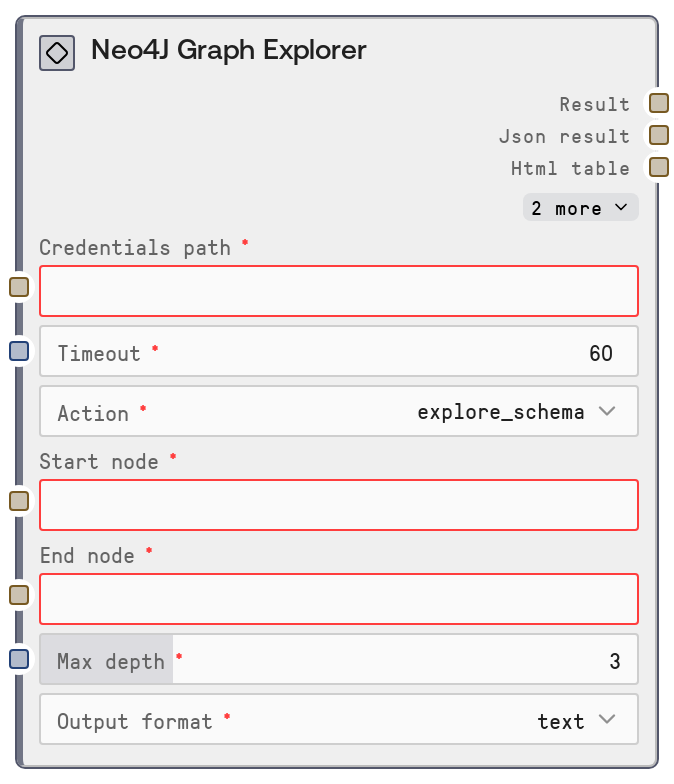
Set action to explore_schema to get a combined view of schema_info, node_labels, and relationship_types in one shot—ideal for first-time inspection of a database. Choose find_paths when you want to discover connection paths between two entities; provide start_node and end_node (e.g., Person:Alice and Person:Bob) and set max_depth (1–10) to limit traversal cost. Use analyze_centrality to compute PageRank-style centrality over a predefined GDS graph projection named myGraph and identify important or influential nodes. Select community_detection to run label propagation via GDS over myGraph and reveal clusters of strongly connected nodes.
In typical workflows, this node is used early for exploration, followed by more specific nodes like SaltNeo4JQuery (to run custom Cypher derived from what you learn) or SaltNeo4JWrite (to update the graph). Downstream, you can feed its JSON or HTML into visualization tools, or its XLSX/PDF outputs into report generation or sharing flows. For ad-hoc analysis and stakeholder reporting, set output_format to all; for automated pipelines, choose a single format to reduce payload size and processing time.
Inputs
| Field | Required | Type | Description | Example |
|---|---|---|---|---|
| timeout | True | INT | Maximum time in seconds to wait for the Neo4J service to complete the requested analysis. Must be a positive integer. Heavy GDS operations on large graphs (centrality, community detection) may require higher values (e.g., 120–300 seconds). | 120 |
| action | True | ENUM['explore_schema','find_paths','analyze_centrality','community_detection'] | Selects which graph exploration operation to run. explore_schema returns combined schema_info, node_labels, and relationship_types. find_paths discovers paths between two nodes up to max_depth hops. analyze_centrality runs a PageRank-based centrality analysis using GDS on an existing projection named myGraph. community_detection applies label propagation via GDS on myGraph to find node communities. | explore_schema |
| start_node | False | STRING | Identifier for the starting node when action is find_paths. You may specify just a name (for example Alice) or label and name in the form Label:Name (for example Person:Alice). Internally, only the portion after the colon is used as the value of the start.name property in the Cypher query. Must be non-empty if action = find_paths. | Person:Alice |
| end_node | False | STRING | Identifier for the ending node when action is find_paths. Same format and handling as start_node: either a simple name (Bob) or Label:Name (Person:Bob), with the part after the colon mapped to end.name in the Cypher. Must be non-empty if action = find_paths. | Person:Bob |
| max_depth | True | INT | Maximum number of hops for path traversal in find_paths. The Cypher pattern is MATCH path = (start)-[*1..max_depth]-(end). Must be between 1 and 10 inclusive. Larger values explore more distant connections but increase query cost and response size. | 3 |
| output_format | True | ENUM['text','html','xlsx','pdf','all'] | Controls how the node formats outputs. text returns a human-oriented text summary plus a JSON string. html returns HTML table-style output. xlsx generates an Excel-friendly representation. pdf builds a PDF report. all uses extended formatting helpers to produce multiple formats at once, which is convenient for exploration and reporting. | all |
Outputs
| Field | Type | Description | Example | ||||
|---|---|---|---|---|---|---|---|
| status | STRING | High-level status or title string from the shared database formatting utilities. On success it typically names the operation (for example Neo4J Graph Schema Exploration, Neo4J Paths: Person:Alice -> Person:Bob). On errors it may contain a short error message. | Neo4J Paths: Person:Alice -> Person:Bob | ||||
| result_json | STRING | JSON-encoded payload containing the primary data results. For explore_schema, it includes keys like schema_info, node_labels, and relationship_types. For find_paths, it holds a list of paths with nodes, relationships, and lengths. For analyze_centrality, it lists nodes with their centrality scores. For community_detection, it lists community IDs with arrays of member node names. | {"schema_info": {"constraints": []}, "node_labels": ["Person","Company"], "relationship_types": ["WORKS_AT","FRIEND_OF"]} | ||||
| html_output | STRING | HTML-formatted representation of the results when output_format is html or all. Usually a table or collection of tables summarizing paths, scores, or schema elements. Empty string or equivalent when HTML export is not requested. |
| ||||
| xlsx_output | BYTES_OR_BLOB | Binary or encoded XLSX content when output_format includes xlsx or all. Provides tabular data equivalent to result_json for analysis in spreadsheet tools. When XLSX is not requested, this is empty or null-equivalent in the workflow. | |||||
| pdf_output | BYTES_OR_BLOB | Binary or encoded PDF file when output_format includes pdf or all. The PDF typically contains labeled sections and tables summarizing schema, paths, centrality scores, or communities. When PDF is not requested, this is empty or null-equivalent. |
Important Notes
- Performance: Centrality and community_detection actions call Graph Data Science procedures (gds.pageRank.stream and gds.labelPropagation.stream) on a projection named myGraph; on large graphs these can be slow and resource intensive, so consider raising timeout and running off-peak.
- Limitations: find_paths relies exclusively on the name property of nodes (start.name and end.name) and does not limit traversal by label; if your graph identifies nodes with different properties (for example id or email), paths may not match expectations.
- Behavior: When action is find_paths, both start_node and end_node must be provided; otherwise the node raises a validation error and does not issue any Cypher query.
- Behavior: analyze_centrality and community_detection assume that a GDS graph projection called myGraph exists and that the GDS plugin is installed and enabled; if not, Neo4J will return GDS-related errors wrapped in the node's result.
- Performance: Choosing output_format = all triggers generation of multiple export formats (text/JSON plus HTML, XLSX, PDF), which increases processing time and output size; in production flows prefer a single format unless multiple are explicitly required.
Troubleshooting
- No paths returned for find_paths: If result_json shows an empty set, verify that node name properties in Neo4J exactly match the values you provided (or the part after the colon in Label:Name), and that max_depth is large enough to cover the actual shortest path length.
- Error indicating start_node or end_node is required: This occurs when action is find_paths but one or both node fields are blank. Fill in valid values for start_node and end_node (for example Person:Alice and Person:Bob) or switch action to a mode that does not need them.
- GDS or myGraph-related errors: Messages about unknown procedure gds.* or graph myGraph not found mean that the Graph Data Science library is not installed or that the myGraph projection has not been created. Install/enable GDS and create the projection before using analyze_centrality or community_detection.
- Timeouts or very slow responses: Increase timeout, reduce max_depth for find_paths, and, for GDS operations, consider using smaller projections or running the node when the Neo4J server is under lower load.