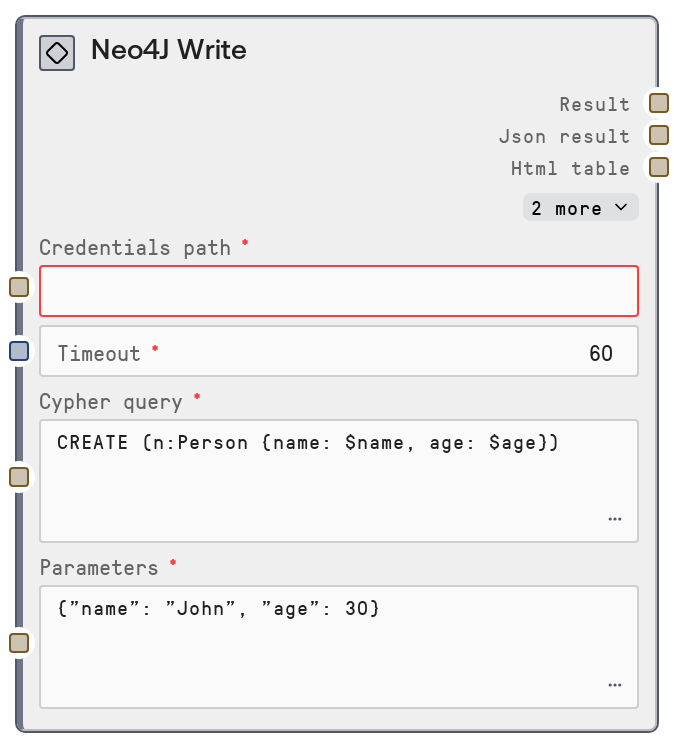
Neo4J Write
This node sends write-oriented Cypher queries (CREATE, MERGE, SET, DELETE, and similar) to a Neo4J graph via the configured Neo4J service. It accepts a Cypher statement and a JSON object of parameters, executes the request against the database, and returns both a human-readable text summary and structured JSON results. If the parameters string is not valid JSON, it safely falls back to using an empty parameter set.
Usage
Use the Neo4J Write node whenever you need to modify data in a Neo4J graph: creating nodes and relationships, updating properties, or deleting entities. It typically appears after a credentials/connection setup step that provides credentials_path and timeout (configured by shared database base settings) and before analytical or querying nodes that rely on the updated graph state, such as SaltNeo4JQuery, SaltNeo4JNodesByLabel, or SaltNeo4JGraphExplorer. Provide a Cypher write statement in cypher_query and a JSON object in parameters mapping named parameters (for example, name for $name) to concrete values. Downstream, use the text output for logging or inspection, and parse the json output when you need to branch logic, audit writes, or feed new IDs and properties into subsequent processing. This node is commonly combined with SaltNeo4JTransaction for multi-step operations that must be atomic, and with discovery nodes like SaltNeo4JSchemaInfo or SaltNeo4JNodeLabels to manage schema-aware updates.
| Field | Required | Type | Description | Example |
|---|
| cypher_query | True | STRING | The Cypher write statement to execute, typically using clauses such as CREATE, MERGE, SET, DELETE, or REMOVE. Named parameters are referenced with the $paramName syntax and bound from the JSON parameters input. The statement must be valid Cypher for the connected Neo4J instance. Multiline statements are supported and you may include a RETURN clause if you need the created or updated entities back in the response. | CREATE (p:Person {name: $name, age: $age})-[:WORKS_AT]->(c:Company {name: $company}) RETURN p, c |
| parameters | True | STRING | JSON-formatted object providing values for any named parameters used in the Cypher query. Keys must match the parameter names without the $ prefix (for example, name for $name). If the string is empty or whitespace, an empty parameter object is used. If the JSON fails to parse, the node logs a warning and also uses an empty object, which may cause the write to fail if the query expects parameters. | {"name": "Alice", "age": 29, "company": "GraphTech Labs"} |
Outputs
| Field | Type | Description | Example |
|---|
| text | STRING | A formatted, human-readable summary of the write operation result. This usually includes a header such as "Neo4J Write Results" plus a short description of what the database reported (for example, how many nodes or relationships were created, updated, or deleted). Use this output for logs, user-facing displays, or quick checks that the write executed as expected. | Neo4J Write Results Summary: 1 node created, 1 relationship created. Labels: Person, Company Properties set: {"name": "Alice", "age": 29, "company": "GraphTech Labs"} |
| json | STRING | A JSON-serialized string containing the raw structured response from the Neo4J write endpoint. This often includes statistics (such as nodesCreated, relationshipsCreated, propertiesSet) and any records returned by the Cypher statement if you used a RETURN clause. Downstream nodes can parse this string to drive decisions, record audit data, or reuse created IDs and properties. | {"stats": {"nodesCreated": 1, "relationshipsCreated": 1, "propertiesSet": 3}, "results": [{"p": {"id": 123, "labels": ["Person"], "properties": {"name": "Alice", "age": 29}}, "c": {"id": 456, "labels": ["Company"], "properties": {"name": "GraphTech Labs"}}}]} |
| html | STRING | An HTML-formatted representation of the write results, suitable for embedding in dashboards or rich UI components. Depending on configuration, this may include tables listing affected nodes, relationships, and key statistics. Some workflows may choose to ignore this field if only plain text or JSON is required. | Neo4J Write Results1 node created, 1 relationship created. | Node | Label | Properties |
|---|
| 123 | Person | {"name":"Alice","age":29} |
|
| file | STRING | Optional file-oriented output such as an export path or identifier, depending on how the shared result formatter is configured. In many simple write scenarios this will be an empty string. When populated, downstream nodes can use it to retrieve exported artifacts such as reports or logs summarizing the write operation. | |
Important Notes
- Performance: Large or complex write operations (for example, bulk creation of thousands of nodes and relationships) can be slow and may require raising the timeout configured through the upstream database settings. Consider batching large imports into multiple smaller writes for better throughput and reliability.
- Limitations: The node does not validate Cypher syntax or parameter completeness before sending the request. Any syntax errors, missing parameters, or constraint violations are returned by the Neo4J service and will appear in the response rather than being caught locally.
- Behavior: If the parameters string is not valid JSON, the node logs a warning and silently falls back to using an empty parameter object. If your Cypher query depends on parameter values, this will typically cause a runtime error from the database rather than from the node itself.
- Behavior: Writes are issued through a dedicated /write endpoint on the Neo4J service. Transactional semantics (for example, rollback behavior on error) are controlled by that service; if you need multiple statements to succeed or fail together, use SaltNeo4JTransaction instead of chaining multiple Neo4J Write calls.
- Performance: Returning many records from a write query that includes a RETURN clause can significantly increase response size and processing time. Prefer returning only the minimal set of properties and entities necessary for downstream steps.
Troubleshooting
- Invalid JSON in parameters: Symptom: the write fails with missing parameter or type errors even though parameters seem provided. Check that parameters is valid JSON (proper quotes, commas, and braces). The node falls back to {} when parsing fails, so your query may be running without the expected parameters.
- Cypher syntax or constraint errors: Symptom: the response contains messages about syntax errors, unknown variables, or constraint violations. Copy the cypher_query into a Neo4J query console, fix syntax or adjust constraints, and then paste the working query back into the node. Also verify that all referenced labels, relationship types, and property names exist as expected.
- Timeouts on heavy writes: Symptom: long-running write operations time out. Increase the timeout in the credentials or database configuration feeding this node, reduce batch sizes (for example, split huge imports into multiple runs), or simplify the query (for example, remove unnecessary RETURN clauses).
- No visible changes in the graph: Symptom: the node appears to run successfully, but new nodes or relationships are not visible. Confirm you are connected to the correct Neo4J instance and database, double-check labels and property values in your cypher_query, and verify that MERGE or WHERE conditions are targeting the data you expect.
- Unexpected empty or partial results in json output: Symptom: the write succeeds but the returned json output lacks records you expected. Ensure your Cypher statement includes a RETURN clause for any nodes or relationships you want back, and that you are not filtering them out inadvertently with WHERE conditions.