Table Read CSV
Usage
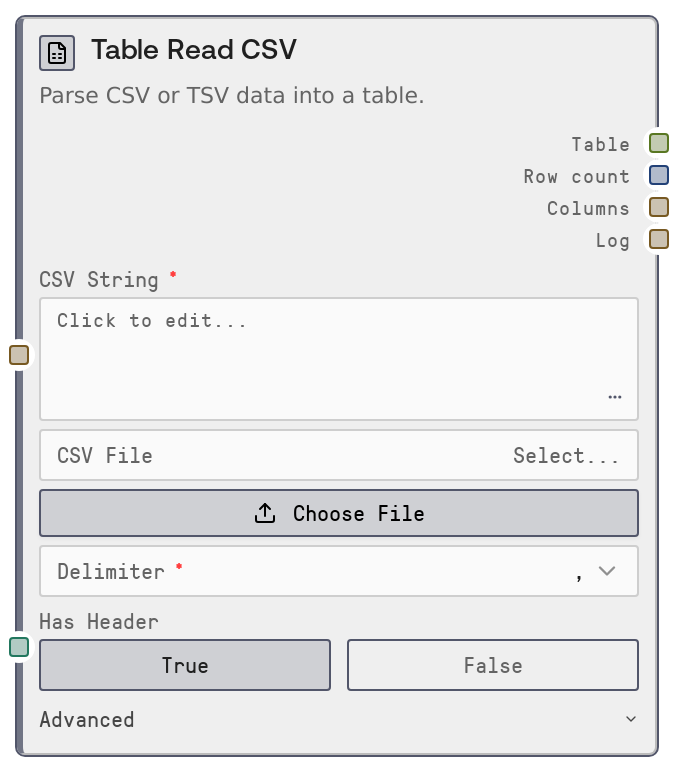
Use this node whenever you need to load CSV- or TSV-formatted data into a Salt workflow as a structured TABLE. Typical scenarios include importing exports from spreadsheets or BI tools, loading log or metrics data, and preparing tabular inputs for analysis, transformation, or model-conditioning nodes. In a workflow, it usually appears at the start of a data pipeline: the user either pastes data into csv_string or uploads a CSV file and selects it via csv_file.
Downstream, connect the table output to nodes such as "SaltTableToCSV" to re-export transformed data, "SaltTableToJSON" to produce JSON payloads for APIs, transformation nodes for filtering or feature engineering, and "SaltTableOutput" to produce downloadable files (CSV, Excel, JSON, Parquet, HTML, Markdown). For example, a common pattern is: Table Read CSV → data-cleaning/feature-engineering nodes → Table Output.
Practical recommendations: use csv_string for small/medium pasted datasets and csv_file for larger or persistent files. Prefer an explicit delimiter when you know it (for example, comma or Tab) and only use "auto" when the format is unknown. If your file starts with descriptive text or notes, use skip_rows and comment_char so that the parser only sees the real header and data. Configure na_values so dataset-specific missing-value tokens (like "N/A" or "-") are normalized to proper nulls for consistent downstream behavior.
Inputs
| Field | Required | Type | Description | Example |
|---|---|---|---|---|
| csv_string | True | STRING | Multiline CSV or TSV text to parse. If non-empty, this input takes precedence over csv_file. Each line is trimmed before parsing, which helps with pasted content that may include indentation. Use this for quick experiments or small datasets copied from spreadsheets, reports, or tools. | customer_id,name,region,spend 1001,Alice Smith,NA,245.90 1002,Bob Jones,EU,189.50 1003,Carla Lopez,LATAM,320.00 |
| delimiter | True | ENUM | Column separator used while parsing. Options: "," (comma), "Tab" (tab character, for TSV), ";" (semicolon), "\|" (pipe), and "auto". When set to "auto" the parser infers the delimiter, which is convenient for unknown formats but can be slower or less robust on unusual data. For reliable production pipelines, explicitly choose the correct delimiter. | auto |
| has_header | True | BOOLEAN | Whether the first parsed row should be treated as column names. When true, the first row becomes the header; when false, generic names like col_0, col_1, col_2 are generated. If set incorrectly, either your first data row will be interpreted as headers or your real header will be treated as data. | true |
| csv_file | False | FILE_ENUM | Name of an uploaded CSV, TSV, or text file in the Salt input directory. Used only when csv_string is empty. The node validates that the selected file exists before parsing, and fails fast if it cannot resolve the path. Prefer this for large datasets or shared project assets. | marketing_campaign_q1_2026.csv |
| encoding | False | ENUM | Text encoding for reading the CSV source. Options: "utf-8" (default), "utf-8-sig" (for Windows Excel UTF-8 with BOM), "latin-1", and "ascii". If you see stray characters at the start of the first column (for example a BOM), rerun with "utf-8-sig". | utf-8-sig |
| skip_rows | False | INT | Number of initial rows to skip before parsing. Use this when your file begins with titles, notes, or metadata instead of the header row. Must be a non-negative integer. If set too high, you may skip part of your actual dataset. | 2 |
| comment_char | False | STRING | Single character used to mark comment lines that should be ignored (for example, "#"). Any line whose first non-whitespace character matches this value will be skipped. Leave empty to disable comment-based skipping. | # |
| na_values | False | STRING | Comma-separated list of tokens that should be treated as null or missing values. Each token is trimmed and passed through to the CSV parser. This is useful when your dataset uses custom markers like "N/A", "NA", or "-" that should all map to null. | N/A,NA,-,. |
Outputs
| Field | Type | Description | Example |
|---|---|---|---|
| table | TABLE | The parsed TABLE representation of the CSV or TSV data, including inferred types, column names, row data, and import metadata (source label, creation timestamp, and input source description). This is the primary output for further table operations. | {'schema': [{'name': 'customer_id', 'dtype': 'int64'}, {'name': 'name', 'dtype': 'string'}, {'name': 'region', 'dtype': 'string'}, {'name': 'spend', 'dtype': 'float64'}], 'data': {'customer_id': [1001, 1002, 1003], 'name': ['Alice Smith', 'Bob Jones', 'Carla Lopez'], 'region': ['NA', 'EU', 'LATAM'], 'spend': [245.9, 189.5, 320.0]}, 'metadata': {'source': 'CSV Read', 'created_at': '2026-04-27T10:15:42.123456', 'input_source': "file 'marketing_campaign_q1_2026.csv'"}} |
| row_count | INT | Number of data rows parsed into the table (excluding any header row). Useful for sanity checks, logging, and branching logic (for example, skipping downstream steps if there are zero rows). | 1500 |
| columns | STRING | Comma-separated list of column names in the resulting table. Helpful for debugging schema issues and for dynamically constructing prompts or UI labels. | customer_id, name, region, spend |
| log | STRING | Human-readable summary of the parse operation, including input source label, row count, column count, and column names. Ideal for status messages or audit logs in larger workflows. | Parsed CSV from file 'marketing_campaign_q1_2026.csv': 1500 rows, 4 columns (customer_id, name, region, spend) |
Important Notes
- Performance: Delimiter auto-detection (delimiter = "auto") uses a more permissive parsing engine and can be slower on large files. For better performance and predictability with big datasets, explicitly choose the correct delimiter.
- Performance: Supplying very large datasets via csv_string increases workflow payload size and memory usage. For large files, prefer uploading the CSV and referencing it through csv_file.
- Limitations: At least one of csv_string or csv_file must be provided. If both are empty, the node raises a validation error and no table is produced. When both are provided, csv_string takes precedence and the file is ignored.
- Limitations: If has_header is misconfigured, the first data row may be treated as a header or your header row may be treated as data, which can cause confusing column names in downstream nodes.
- Behavior: When has_header is false, the node generates generic column names (col_0, col_1, and so on). If downstream nodes expect specific names, add a renaming or schema-adjustment step after this node.
- Behavior: The node validates that any selected csv_file exists in the input directory before reading it. An invalid or missing file path results in a clear error instead of silent fallback behavior.
Troubleshooting
- Common Error 1: Error indicating that you must provide either CSV String or CSV File occurs when both csv_string and csv_file are empty. Fix by either pasting CSV content into csv_string or selecting an uploaded file in csv_file.
- Common Error 2: Errors like "Invalid file path" or "CSV file not found" indicate that the selected csv_file cannot be resolved in the input directory. Ensure the file is uploaded to the correct location and that the file name selected in the UI matches the actual file.
- Common Error 3: If columns look misaligned or you see all data in a single column, the delimiter or has_header may be wrong. Re-run with the correct delimiter (for example, switch from comma to Tab for TSV) and verify has_header matches the file structure.
- Common Error 4: If the first column name contains strange leading characters (for example, a BOM), set encoding to "utf-8-sig" to handle Excel-style UTF-8 with BOM correctly.
- Common Error 5: When row_count is unexpectedly small or zero, review skip_rows and comment_char. Too many skipped rows or a comment_char that matches normal data lines can cause valid rows to be dropped.