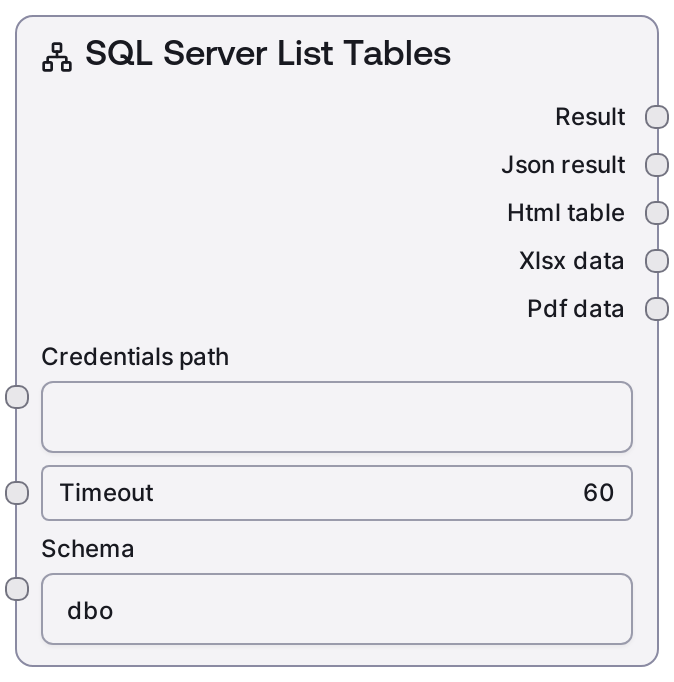
SQL Server List Tables
This node connects to a Microsoft SQL Server instance using a stored MSSQL credential profile and lists all tables in a specified schema. It relies on the shared database base node for connection management and querying, then returns both a human-readable summary and structured outputs. It is intended for schema discovery and validation before building queries or table-specific workflows.
Usage
Use this node when you need to discover which tables exist in a particular SQL Server schema before constructing queries, selecting tables for analytics, or driving UI choices. Place it early in a workflow where an upstream step provides the MSSQL credentials_path and timeout (for example, via a credential manager or configuration node), then set the schema to inspect (dbo by default). Downstream, connect it to nodes like SaltMSSQLTableInfo to inspect the structure of a selected table, SaltMSSQLQuery to run SELECT statements against chosen tables, or orchestration/logic nodes that build dynamic menus from the list of tables. This works well in patterns such as: environment introspection (list tables then inspect key ones), interactive analytics flows (user picks schema → node lists tables → user picks table → query runs), and documentation/governance jobs that periodically enumerate available tables. Prefer targeting specific schemas (such as dbo, sales, or reporting) rather than broad scans to keep response times reasonable and results focused.
| Field | Required | Type | Description | Example |
|---|
| credentials_path | True | STRING | Identifier used by the platform to load the MSSQL credential profile. The referenced profile must include all necessary connection details (host, port, database, and authentication) following the mssql credential template. If this path does not correspond to a stored credential, the connection will fail. | vault://database-creds/prod-mssql-reporting |
| timeout | True | INT | Maximum duration in seconds allowed for listing tables before the operation is aborted. Must be a positive integer. Larger or busier databases and high-latency networks may require a higher timeout, but excessively large values can hold onto worker resources for too long. | 30 |
| schema | True | STRING | Name of the database schema from which to list tables. Must match an existing schema in the connected SQL Server database. The default is typically dbo; use more specific schemas (for example sales, analytics, reporting) to reduce noise and improve performance. | dbo |
Outputs
| Field | Type | Description | Example |
|---|
| text_output | STRING | Human-readable summary describing the tables discovered in the specified schema. Intended for logs, UI display, or as context for reasoning steps. Usually includes the schema name and a line-separated list of table names or a clear message if no tables are found. | Found 3 tables in schema 'dbo': - users - orders - order_items |
| json_output | STRING | JSON-encoded structured representation of the result. Typically contains the schema name and an array of table names, and may include additional metadata depending on the base database implementation. Use this when downstream nodes expect machine-readable JSON. | {"schema":"dbo","tables":["users","orders","order_items"]} |
| table_data | STRING | Tabular-style serialization of the table list, suitable for consumers that expect table-like or CSV-style input. Each row commonly represents one table, with columns such as table_name and schema. | table_name,schema users,dbo orders,dbo order_items,dbo |
| diagnostics | STRING | JSON-encoded diagnostic information about the operation, such as execution time, row count, and effective schema. Useful for monitoring, debugging, or performance analysis. | {"duration_ms":124,"schema":"dbo","row_count":3} |
| raw | STRING | Raw, low-level payload returned by the underlying driver or base node, often containing unprocessed records. Usually not needed in standard workflows, but helpful for debugging or custom integrations that require full metadata. | {"raw_result":[{"TABLE_SCHEMA":"dbo","TABLE_NAME":"users"},{"TABLE_SCHEMA":"dbo","TABLE_NAME":"orders"}] |
Important Notes
- Performance: Listing tables on very large schemas or instances with many objects can take noticeable time; increase the timeout as needed but avoid extreme values that may tie up worker capacity.
- Limitations: The node only lists tables that the configured MSSQL user has permission to see; if expected tables are missing, the cause is often database permissions rather than node behavior.
- Behavior: The exact structure of json_output, table_data, and raw is determined by the shared database base node and underlying driver; downstream consumers should focus on fields like schema and table name instead of assuming a fixed column order.
- Behavior: When the target schema contains no accessible tables, the node returns an empty list in structured outputs and a readable message indicating that no tables were found.
Troubleshooting
- Common Error 1: Authentication errors such as "Login failed for user" – confirm that credentials_path points to a valid MSSQL credential profile and that its username, password, and server details are correct.
- Common Error 2: Unexpectedly empty results or messages indicating the schema does not exist – verify the schema string is correct (including case and spelling) and that the user has permission to view objects in that schema.
- Common Error 3: Operations timing out when querying busy or remote servers – increment the timeout value moderately (for example from 30 to 60 seconds) and avoid running many heavy database operations in parallel.
- Common Error 4: Downstream nodes failing to parse json_output – ensure they are expecting a JSON string and, if required, add a parsing or transformation step that converts the JSON into the specific structure those nodes require.