Memory Read
Usage
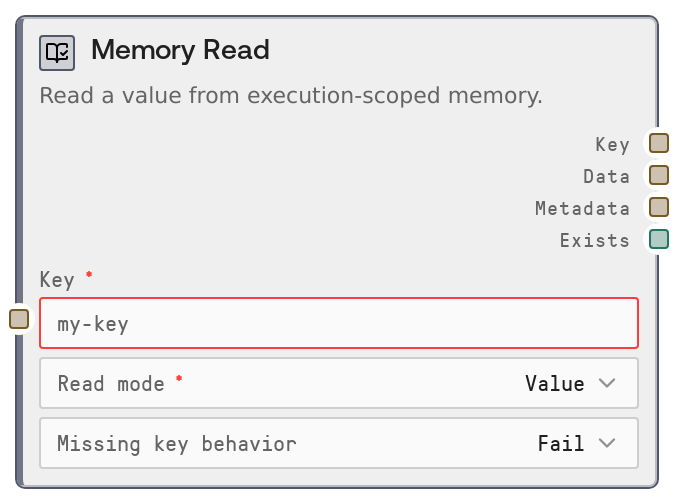
Use Memory Read when you need to fetch information that was previously stored during the same workflow execution. Common scenarios include reusing an LLM response across multiple branches, retrieving structured JSON written earlier, or checking whether a specific step has already produced output. Place this node downstream of nodes that write to memory (for example, a Memory Write node or other storage-producing nodes targeting execution memory), and upstream of consumers such as LLM, decision, or routing nodes.
Configure a key that uniquely identifies the memory entry. The read_mode decides whether you fetch the full stored value (for data reuse) or "Metadata Only" (for light-weight existence checks and inspection of metadata without loading the value). The missing_key_behavior determines what happens if the key is not found: "Fail" stops the workflow, "Return empty" yields an empty data string, and "Return default" yields your configured default_value. default_value is only used when the behavior is set to return a default and should contain valid JSON text if you intend to parse it downstream.
Typical patterns: (1) Write an LLM summary to memory under a stable key, then later use Memory Read to load that summary and feed it into another LLM node. (2) Use SaltMemoryKeys to list all keys, loop over them, and call Memory Read for each to process stored items in bulk. (3) Use Metadata Only mode with exists to implement conditional branches that run only if a particular result was already produced earlier in the execution.
Inputs
| Field | Required | Type | Description | Example |
|---|---|---|---|---|
| key | True | STRING | The memory key to read. Must satisfy storage key validation rules and refer to an entry written during the same workflow execution. Keys are typically short, namespaced strings and are scoped per execution. | conversation.summary |
| read_mode | True | ENUM(READ_MODES) | Controls what is returned. In value mode, the node returns the stored data along with metadata. In "Metadata Only" mode, it returns only metadata and leaves data as an empty string, which is useful for quick existence checks or inspecting metadata for large values. | Metadata Only |
| missing_key_behavior | False | ENUM(MISSING_KEY_BEHAVIORS) | Specifies what to do if the key does not exist in memory. "Fail" raises an error and stops the workflow. "Return empty" yields an empty data string with exists set to false. "Return default" yields the default_value as data with exists set to false, allowing the workflow to continue with a fallback value. | Return default |
| default_value | False | STRING | Fallback value returned in the data output when the key is missing and missing_key_behavior is set to "Return default". This is treated as a JSON string by convention; if downstream nodes parse it, ensure it is valid JSON. | {"summary":"No conversation history available yet.","messages":[]} |
Outputs
| Field | Type | Description | Example |
|---|---|---|---|
| key | STRING | The key that was requested. Echoed back to help correlate outputs when working with multiple keys or in loops. | conversation.summary |
| data | STRING | The stored value serialized as a JSON string when read_mode returns values and the key exists. It is an empty string when read_mode is "Metadata Only" or when the key is missing and behavior is "Return empty". When behavior is "Return default", it equals the configured default_value. | {"summary":"User asked about pricing; I explained the three plans.","message_count":12} |
| metadata | STRING | Metadata for the memory entry, returned as a JSON string. Typical fields may include timestamps, size, or backend-specific attributes; the exact schema depends on the storage system. | {"created_at":"2024-05-01T10:23:45Z","updated_at":"2024-05-01T10:25:02Z","bytes":428} |
| exists | BOOLEAN | True if the key exists in memory, false if it does not and a non-failing missing_key_behavior was applied. Use this to branch logic based on presence or absence of data. | True |
Important Notes
- Performance: For large stored values, prefer "Metadata Only" when you just need to check existence or basic info; it avoids loading and serializing the full payload.
- Limitations: Memory entries are scoped to a single workflow execution; data written in one run is not visible to another, so this node is not suitable for long-term or cross-run storage.
- Behavior: If workflow_execution_id is missing, the node raises an error instead of returning empty data; this usually indicates that it is being run outside a valid workflow execution context.
- Behavior: default_value is not validated as JSON by this node; if downstream nodes expect JSON and it is malformed, they may fail when parsing.
- Integration: The structure of metadata depends on the underlying storage backend and may change; avoid tightly coupling downstream logic to a fixed metadata schema unless you control that backend.
Troubleshooting
- Key not found with behavior set to Fail: If the workflow stops due to a missing key, ensure an upstream node wrote to this key in the same execution or change missing_key_behavior to "Return empty" or "Return default" if missing data is acceptable.
- "Execution ID is not available in this context.": This indicates the node is running without a valid workflow_execution_id, often outside a normal workflow. Make sure it is part of a proper workflow run and do not override the hidden context inputs.
- Downstream JSON parse failures: If consumers fail when parsing data, check that the stored value or default_value is valid JSON and that you are not in "Metadata Only" mode, where data will be an empty string.
- Empty data but exists is true: This usually means read_mode is set to "Metadata Only". Switch to a value-returning mode if you need the actual stored data content.