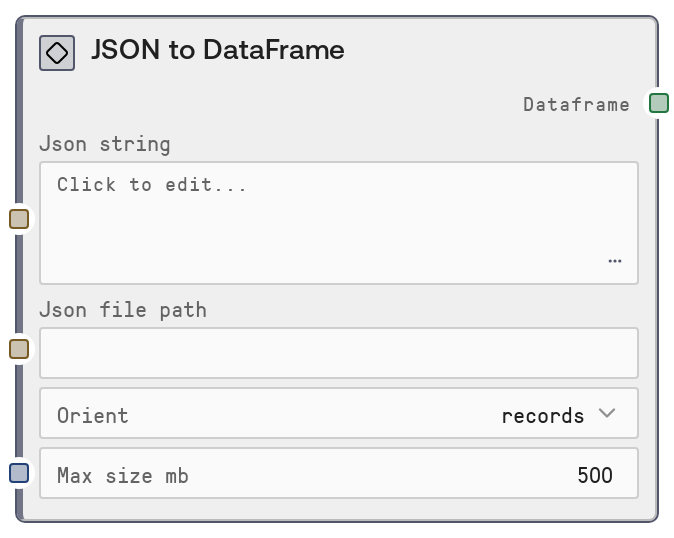
JSON to DataFrame
This node parses JSON content from either a raw string or a file path and converts it into a DataFrame object. It supports multiple JSON orientations (records, columns, index, values) and applies a maximum size safeguard to reduce out-of-memory risks. It is designed as an entry point for turning structured JSON data into a tabular format for further analysis, transformation, or display in Salt.
Usage
Use this node whenever you have JSON data and want to work with it as a table in Salt. Typical scenarios include: (1) loading API responses or exported JSON logs into a DataFrame for filtering, joining, and aggregation, (2) converting JSON configuration or analytics data into a structured table, and (3) turning file-based JSON datasets into a tabular form for visualization. In a workflow, this node usually appears early in the pipeline: upstream you might have nodes that fetch or generate JSON (e.g., HTTP request nodes, file loader nodes, or LLM nodes emitting structured JSON), and downstream you can chain nodes like DataFrameFilterNode, DataFrameSelectColumnsNode, DataFrameToCSVNode, or DataFrameToHTMLTableNode. Prefer providing either a JSON string for smaller, dynamic payloads (e.g., API calls) or a file path for larger, static datasets. Choose the orient parameter to match your JSON structure (for example, records for a list of row objects, columns for column-based JSON). Use the max_size_mb limit to prevent memory issues when consuming large JSON files or responses in production workflows.
| Field | Required | Type | Description | Example |
|---|
| json_string | False | STRING | Raw JSON content to convert into a DataFrame. Use this when the JSON is already in memory (e.g., from an API response or previous node). Leave empty if you are using json_file_path. Must be valid JSON and should match the selected orient (e.g., for 'records', typically a list of objects like [{"id": 1, ...}, ...]). Avoid extremely large strings and instead use file-based processing when data is very large. | [{"user_id": 101, "country": "US", "spend": 23.75}, {"user_id": 102, "country": "DE", "spend": 19.40}] |
| json_file_path | False | STRING | Filesystem path to a JSON file to be converted into a DataFrame. Use this when working with larger, stored datasets (e.g., exports from a data warehouse or log files). Leave empty if you are using json_string. The file must contain valid JSON that aligns with the specified orient. The node will typically validate file size against max_size_mb before loading to help prevent excessive memory usage. | /data/exports/daily_orders_2026-04-01.json |
| orient | False | STRING_ENUM[records,columns,index,values] | Specifies the expected structural layout of the JSON and how it should be interpreted as a DataFrame. Commonly, records means a list of row objects (e.g., [{"col1": ..., "col2": ...}]), columns means an object keyed by column name with lists of values, index means an object keyed by index labels, and values is typically a simple nested list of row values. Choose the option that matches how your JSON is formatted. | records |
| max_size_mb | False | INT | Upper limit on the size of the JSON content (either from string or file) in megabytes. If the data exceeds this threshold, the node will typically raise an error instead of attempting to load it to prevent out-of-memory failures. Must be between 1 and 2000. Adjust this based on the infrastructure capacity and expected dataset size. | 500 |
Outputs
| Field | Type | Description | Example |
|---|
| dataframe | DATAFRAME | A DataFrame object representing the parsed JSON as a table. Each column corresponds to fields derived from the JSON structure, and each row is a record or entry, depending on the chosen orient. This DataFrame can be consumed by other table/DataFrame nodes for filtering, aggregation, joining, visualization, or exporting. | A DataFrame with columns ['user_id', 'country', 'spend'] and rows like [101, 'US', 23.75], [102, 'DE', 19.40], derived from the input JSON. |
Important Notes
- Performance: The max_size_mb parameter is crucial for preventing the node from attempting to load overly large JSON payloads that could exhaust memory; set it conservatively in shared or resource-limited environments.
- Limitations: Exactly one of json_string or json_file_path must be provided—if both are empty or both are set, the node raises a ValueError and does not produce a DataFrame.
- Limitations: The node assumes structurally consistent JSON that matches the chosen orient; mixed or deeply irregular structures may result in errors or unexpected column layout.
- Behavior: When using 'records' orient, missing fields across different records will typically produce columns with null/NaN values for those entries rather than failing outright, which can affect downstream aggregations.
Troubleshooting
- Common Error 1: "Either json_string or json_file_path must be provided" – Ensure you supply one of these inputs. If reading from a file, leave json_string empty; if using inline JSON, leave json_file_path empty.
- Common Error 2: "Provide either json_string or json_file_path, not both" – The node does not support mixing sources; clear one of the fields so that only a single source is used.
- Common Error 3: JSON parse errors (e.g., "Expecting ',' delimiter" or similar) – This indicates invalid JSON syntax in the string or file. Validate the JSON externally or by using a JSON linter, and ensure it structurally matches the orient you selected.
- Common Error 4: Data too large or memory issues – If you encounter failures when loading large JSON files, lower the max_size_mb threshold to catch this earlier, or pre-split/aggregate the data upstream so each run processes a smaller subset.