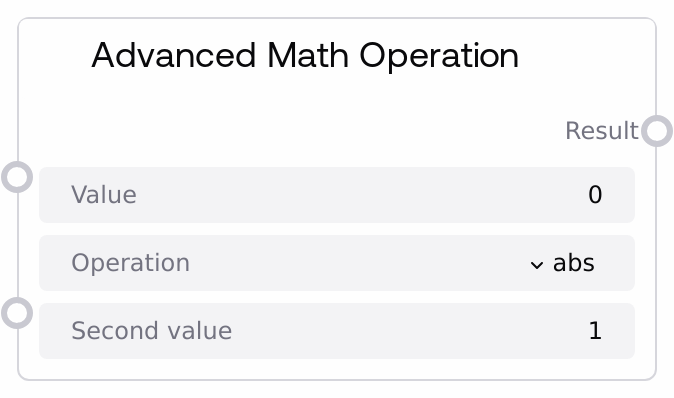
Advanced Math Operation
This node applies a set of advanced mathematical operations to a single numeric value, optionally using a second integer for pair-based operations. It supports absolute value, square root, cube root, factorial of the integer part, greatest common divisor (GCD), and least common multiple (LCM). Inputs are guarded to avoid invalid cases (such as negative square roots or excessively large factorials), and the result is always returned as a float.
Usage
Use this node when you need higher-level numeric utilities beyond basic arithmetic in a Salt workflow. Common scenarios include normalizing values with abs, computing magnitudes with sqrt or cbrt, using factorial for combinatorial counts on an integer-like parameter, or simplifying ratios and periodicities using GCD and LCM. It is typically placed after nodes that produce numeric outputs (for example, Int Math Operation, Float Math Operation, or parameter/numeric-input nodes). For GCD and LCM, provide both the primary value and a second integer; for abs, sqrt, cbrt, and factorial, second_value is configured but not used by the operation. Downstream, connect the result to nodes such as Comparison Operation for branching, Rounding Operation for formatting, or Statistical Operation for aggregation and analysis. Choose this node when you want a compact, dropdown-driven way to access several advanced operations in one place instead of wiring separate nodes or custom code for each.
| Field | Required | Type | Description | Example |
|---|
| value | True | FLOAT | Primary numeric input for the chosen operation. For abs, sqrt, cbrt, and factorial this is the main operand; for GCD and LCM it is the first of the two integers. For factorial, GCD, and LCM, the node internally converts this to a non-negative integer using its absolute value and integer part. Allowed configuration range is from -1e10 to 1e10. | 36.0 |
| operation | True | ENUM["abs","sqrt","cbrt","factorial","gcd","lcm"] | Selects which advanced operation to perform. "abs" returns the absolute value of value; "sqrt" returns the square root and is only valid for non-negative inputs; "cbrt" returns the cube root and supports negative values; "factorial" uses the integer part of the absolute value; "gcd" and "lcm" compute the greatest common divisor and least common multiple between the integer parts of value and second_value. | gcd |
| second_value | True | INT | Secondary integer operand used only when operation is "gcd" or "lcm"; it is ignored for abs, sqrt, cbrt, and factorial. The configured range is from 1 to 1000. Internally, the absolute value and integer part are used, so negative or fractional inputs effectively become a non-negative integer. | 24 |
Outputs
| Field | Type | Description | Example |
|---|
| result | FLOAT | The numeric result of the selected advanced operation, always returned as a float, even when the mathematical result is an integer. This output can be passed directly into subsequent numeric-processing, comparison/branching, visualization, or aggregation nodes. | 12.0 |
Important Notes
- Performance: Factorial grows extremely quickly; to prevent overflow and heavy computation, the node caps the integer argument for factorial at 170. If the implied integer exceeds this threshold, the node logs a warning and returns 0.0.
- Limitations: The sqrt operation does not accept negative inputs. When value is negative and operation is "sqrt", the node logs a warning and returns 0.0 instead of producing a complex number.
- Behavior: For factorial, GCD, and LCM, both value and second_value are coerced using int(abs(x)) before computation. This discards signs and fractional parts, which can lead to differences from expectations if you rely on the exact original numbers.
- Behavior: For LCM, if either coerced integer operand is 0, the node returns 0.0 as the least common multiple. This is a defensive design choice for handling zero inputs gracefully.
- Behavior: If an unknown operation name is provided or an internal error occurs, the node logs the issue and returns 0.0, which keeps pipelines robust but may hide configuration mistakes if logs are not monitored.
Troubleshooting
- Factorial returns 0.0 for large inputs: If factorial yields 0.0, check the magnitude of value. When the integer part of |value| is greater than 170, the node refuses to compute the factorial to avoid overflow and instead returns 0.0. Reduce the input magnitude or approximate the factorial upstream if necessary.
- Unexpected 0.0 from sqrt: If you see 0.0 from a sqrt operation, verify that value is non-negative. Any negative value is treated as invalid, triggering a warning and returning 0.0. Add validation or clamping upstream if negative values are possible.
- GCD/LCM results differ from expectations with fractional or negative values: Remember that both operands are converted to non-negative integers via int(abs(x)) before computing GCD or LCM. For example, inputs -7.9 and 3.2 are treated as 7 and 3. If exact integer semantics are critical, ensure that upstream nodes already output the intended integers.
- LCM returning 0.0 even with non-zero-looking inputs: LCM returns 0.0 if either operand becomes 0 after coercion, which may happen if you pass very small values that truncate to 0 (e.g., 0.3 -> 0). Check your inputs and, if needed, round or scale them before calling LCM.