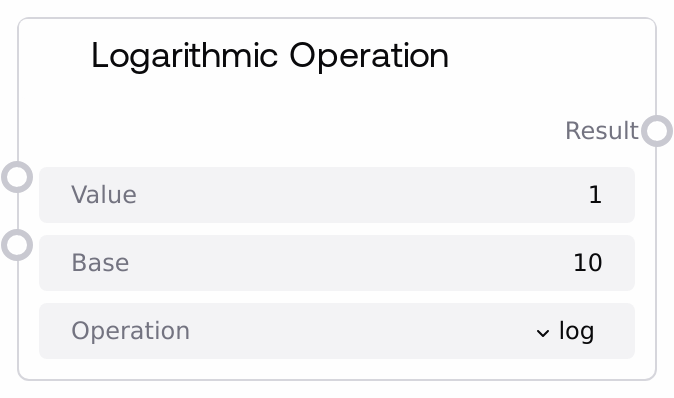
Logarithmic Operation
This node performs common logarithmic and exponential operations on a single floating-point value, with optional custom base for general logarithms. It supports natural, base-10, and base-2 logs, as well as eⁿ and 2ⁿ exponentials, while enforcing domain checks to avoid invalid inputs. It returns a single float result suitable for further numeric processing or parameter control.
Usage
Use this node whenever you need to compress, expand, or remap numeric scales using logarithmic or exponential functions. Typical scenarios include converting linear controls to perceptual scales (for example, brightness-like or volume-like parameters), calculating feature transformations for AI workflows, or tuning parameters that need exponential growth or decay. It usually appears after nodes that generate or aggregate numeric values (such as SaltFloatMathOperation, SaltStatisticalOperation, or configuration/slider inputs) and before nodes that consume a transformed scalar (such as schedulers, conditioning controls, weighting, or blending nodes). For example, use log or ln to reduce dynamic range of very large values, log10 for values expressed in powers of ten, log2 for operations involving doubling or halving, exp to convert linear time or steps into exponential growth, and exp2 for power-of-two scaling. Combine it with SaltComparisonOperation to clamp or validate values before taking logs, or with SaltRoundingOperation if you need discrete rounded results from exponential outputs. Always respect the valid domains for log operations (value > 0 and base > 0, base ≠ 1) to avoid falling back to the safe default result.
| Field | Required | Type | Description | Example |
|---|
| value | True | FLOAT | The primary numeric argument used by the selected operation. For all logarithmic operations (log, ln, log10, log2), this must be strictly positive; the node will return 0.0 if value is less than or equal to 0. For exponential operations (exp, exp2), any real float in the allowed range is valid. The control range is from 0.001 to 1e10 with a step of 0.001. | 1000.0 |
| base | True | FLOAT | The base used only when operation is "log" (custom base logarithm). It must be greater than 0 and not equal to 1. If value is less than or equal to 0, base is less than or equal to 0, or base equals 1, the node logs a warning and returns 0.0. For all other operations (ln, log10, log2, exp, exp2) this input is ignored but must still be provided within 0.001 to 1e10. | 10.0 |
| operation | True | STRING: ENUM[log, ln, log10, log2, exp, exp2] | Selects which transformation to apply. "log" uses the provided base; "ln" is natural logarithm (base e); "log10" is base-10 logarithm; "log2" is base-2 logarithm; "exp" computes e raised to the power of value; "exp2" computes 2 raised to the power of value. Invalid operation names are guarded and return 0.0. | log10 |
Outputs
| Field | Type | Description | Example |
|---|
| result | FLOAT | The numeric result of the chosen logarithmic or exponential operation. It is always returned as a single float, or 0.0 if the input was outside the valid domain or an internal error occurred. This value is typically used as a scalar parameter, weight, or control value for downstream nodes that accept FLOAT inputs. | 3.0 |
Important Notes
- Performance: Operations are very fast scalar math calls; overhead is negligible unless executed in extremely tight, repeated loops.
- Limitations: For log, ln, log10, and log2, the node returns 0.0 instead of raising errors when value is less than or equal to 0 (and also when base is less than or equal to 0 or base equals 1 for log), which may hide invalid-input issues if you do not monitor results.
- Behavior: The base input is only used when operation is "log"; for all other operations it is ignored but must still be set to a valid numeric range.
- Behavior: On any unexpected internal error, the node logs an error and returns 0.0, so downstream logic should not assume non-zero results are always meaningful.
Troubleshooting
- Result is always 0.0 for logarithms: Check that value is strictly greater than 0, and for log also ensure base is greater than 0 and base is not equal to 1. If these conditions are not met, the node safely returns 0.0.
- Unexpectedly large or extreme values from exp or exp2: Very large positive value (for example, greater than about 100 for exp or exp2) can cause extremely large outputs that may destabilize downstream nodes. Clamp or scale value beforehand using SaltComparisonOperation (clamp) or SaltFloatMathOperation (divide) to keep it in a reasonable range.
- Changes to base seem to have no effect: Verify that the selected operation is "log". For "ln", "log10", "log2", "exp", and "exp2", the base input is intentionally ignored, so adjusting it will not change the result.
- Downstream node reports invalid value range: Some consumers expect results within specific bounds (for example, 0 to 1). After this node, normalize or clamp the result (for example, divide by a maximum expected value with SaltFloatMathOperation, or use SaltComparisonOperation to clamp).