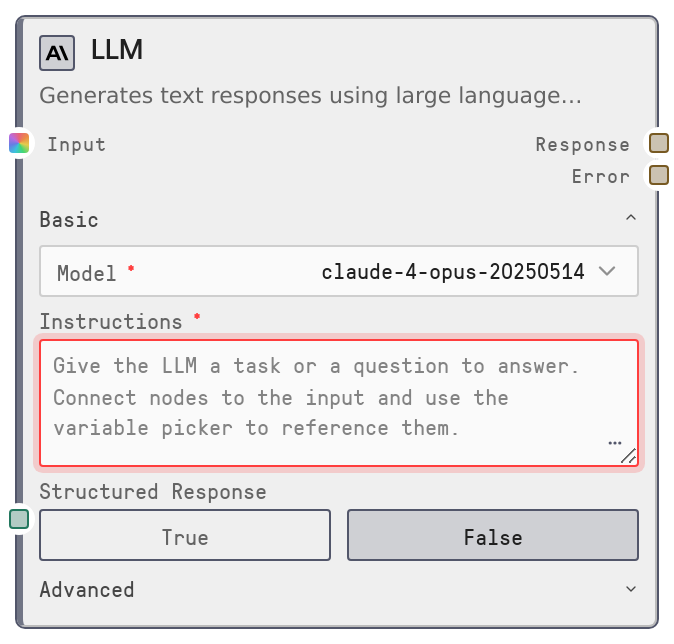
LLM
SaltLLM is a universal large language model node that performs a single completion call across supported LLM providers via the Salt LLM service. It accepts system and user prompts, optional contextual inputs, and tuning parameters to generate a text or JSON response. It also supports JSON schema–based structured outputs and automatic fallback to a backup model if the primary call fails.
Usage
Use SaltLLM any time you need a direct LLM call in a workflow: Q&A, summarization, rewriting, classification, code generation, or structured JSON responses. Place it after nodes that prepare text or data (for example SaltTextInput, data loaders, or prompt builders) and before nodes that consume the LLM result (such as output, JSON parsing, routing, or storage nodes). In the node browser it is exposed via presets like "Anthropic LLM", "OpenAI LLM", or "Gemini LLM" which are all SaltLLM with different default models. Connect upstream nodes to context_data so their outputs can be referenced inside system_prompt and user_prompt using double-brace variables (for example {{CustomerInfo.output}}). Turn on json_mode and provide response_schema when you need machine-readable output that fits a known shape, then feed response into validators, routers, or databases. Choose model based on quality, speed, and cost, keep max_tokens as low as practical, use moderate temperature for reliability, and set fallback_model for robustness in production.
| Field | Required | Type | Description | Example |
|---|
| user_prompt | True | DYNAMIC_STRING | Main instructions or question for the LLM. Supports variable substitution using double-brace placeholders that reference connected nodes via context_data. Can be multiline; should clearly describe the task and any formatting requirements. | Summarize the following support ticket in 3 bullet points:\n\n{{TicketText.output}} |
| model | True | COMBO | LLM model to use. Options are loaded from the Salt LLM service and grouped by provider. You select by human-friendly name; the node resolves it to the provider model ID internally. | anthropic/claude-3-5-sonnet-20241022 |
| max_tokens | True | INT | Maximum number of tokens the model may generate. Range 0 to 128000. Larger values allow longer answers but increase latency and cost; typical values are 256–4096. | 2048 |
| system_prompt | False | DYNAMIC_STRING | High-level instructions defining the assistant’s role, rules, and tone. If empty, a default system prompt is used. Supports variable substitution using values from context_data. | You are a senior support analyst. Write concise, neutral summaries suitable for an internal CRM system. |
| temperature | False | FLOAT | Controls randomness of outputs. Range 0 to 2, default 0.7. Lower values make responses more deterministic; higher values make them more diverse and creative. | 0.5 |
| context_data | False | * | Multi-connect input for upstream data. Each connected node’s output is collected into a context object whose fields can be referenced in prompts with patterns like {{NodeName.output}}. Used only for prompt variable substitution, not sent as a separate field to the LLM API. | Connected nodes such as FetchCustomerProfile.output and LoadConversationHistory.output, then used in the prompt as {{FetchCustomerProfile.output}}. |
| top_p | False | FLOAT | Nucleus sampling parameter (0 to 1). When set, the model samples from the smallest token set whose cumulative probability exceeds this value. Not all providers use it; leaving it null uses provider defaults. | 0.9 |
| top_k | False | INT | Limits sampling to the top K most probable tokens. Range 1 to 500. Only supported by some providers; ignored where unsupported. | 40 |
| frequency_penalty | False | FLOAT | Penalty applied to tokens in proportion to how often they have already appeared, to reduce repetition. Range -2 to 2; small positive values help avoid repetitive wording. | 0.3 |
| presence_penalty | False | FLOAT | Penalty that encourages the model to introduce new topics instead of staying on the same one. Range -2 to 2; positive values increase topical diversity. | 0.2 |
| json_mode | False | BOOLEAN | When true, the node configures the call for structured JSON only and strongly instructs the model to respond with valid JSON and no extra text. Enables provider-native response_format handling. | True |
| response_schema | False | STRING | JSON schema (or schema-like object) that describes the desired output shape. Used only when json_mode is true. Injected into the system prompt and used for optional local validation. | {\n "type": "object",\n "properties": {\n "summary": {"type": "string"},\n "sentiment": {"type": "string", "enum": ["positive", "neutral", "negative"]}\n },\n "required": ["summary", "sentiment"]\n} |
| fallback_model | False | COMBO | Optional backup model to try automatically if the primary model fails. Uses the same option set as model. If unset or equal to model, no fallback attempt is made. | openai/gpt-4o |
Outputs
| Field | Type | Description | Example |
|---|
| response | STRING | The LLM’s primary output. In normal mode this is free-form text. In json_mode with response_schema it is a JSON string that has had any markdown fences removed and may have been validated against the schema. | {\n "summary": "The customer cannot log into their account due to a password reset loop.",\n "sentiment": "negative"\n} |
| error | STRING | Error message when execution fails. Typically empty on success. When both primary and fallback models fail, the node raises an execution error rather than silently returning an empty response. | LLM call failed: provider_timeout: upstream model did not respond within 30s; fallback model also failed: rate_limit_exceeded |
Important Notes
- Performance: Latency and cost grow with max_tokens, model choice, and the complexity of prompts; use smaller max_tokens and efficient models for high-traffic or real-time workloads.
- Limitations: SaltLLM only performs a single completion; it does not include tool calling, multi-step agents, memory, or knowledge base retrieval. Combine it with other nodes for those behaviors.
- Behavior: With json_mode enabled, the node requires valid JSON. It strips markdown fences and may validate against response_schema; malformed JSON or schema mismatches will cause the node to fail.
- Behavior: If the primary model fails and fallback_model is configured to a different model, the node automatically retries with normalized parameters for the fallback model before surfacing an error.
- Behavior: context_data is used only for building prompts via variable substitution; it is not automatically added as structured context in the LLM payload, so variables in prompts must accurately match connected node outputs.
Troubleshooting
- Invalid JSON in structured mode: If you see an error stating that structured response mode requires valid JSON, the model returned malformed JSON. Reduce temperature, simplify response_schema, and make the JSON-only requirement explicit in your prompts.
- Schema validation failures: Errors mentioning that output does not match the provided JSON schema mean the response shape conflicts with response_schema. Relax schema constraints, align your instructions with the schema, or temporarily disable json_mode to inspect the raw output.
- No models listed in model field: If the model dropdown only shows a placeholder such as no models available, the Salt LLM service is not returning models. Check provider API keys, network connectivity, and model catalog configuration, then refresh the node browser.
- Unstable or off-topic outputs: When responses are too random or off-topic, lower temperature and optionally set small positive frequency_penalty or presence_penalty. Also refine system_prompt and user_prompt to be more concrete and constrained.
- Fallback not used: If failures are not recovered by fallback_model, verify that fallback_model is set, differs from model, and corresponds to a valid option in the model list. Invalid or misspelled names prevent a successful retry.