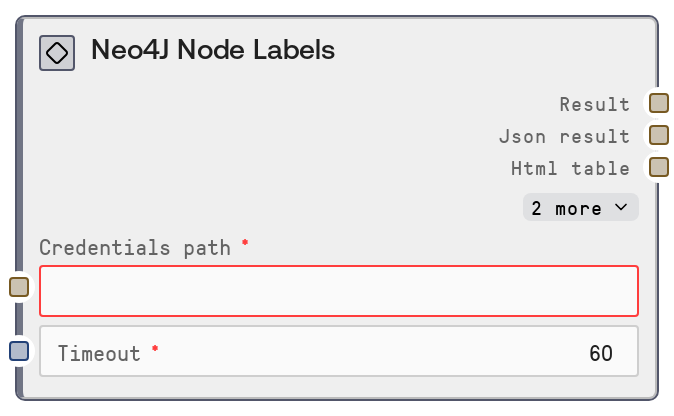
Neo4J Node Labels
This node queries a Neo4J instance and returns all distinct node labels present in the database. It uses configured Neo4J credentials and a shared Neo4J service endpoint to call a node-labels metadata API, then formats the response as human-readable text plus JSON. It is a lightweight schema discovery tool to help you understand the structure of your graph.
Usage
Use the Neo4J Node Labels node when you need to explore or validate the schema of your Neo4J graph, typically before building label-specific queries, analytics, or visualization workflows. It usually appears early in a pipeline: you might first confirm connectivity with Neo4J Test Connection or inspect basics with Neo4J Database Info, then call Neo4J Node Labels to discover which labels exist, and finally feed selected labels into Neo4J Nodes by Label or custom Cypher query nodes. It works well alongside Neo4J Relationship Types, Neo4J Property Keys, and Neo4J Schema Info to build a complete schema overview workflow. In interactive tools or applications, you can use this node to dynamically populate label selectors or to perform pre-flight checks that required labels are present before executing writes or heavy analysis.
| Field | Required | Type | Description | Example |
|---|
| credentials_path | True | STRING | Path or identifier pointing to stored Neo4J credentials. This must reference a valid credential set for the 'neo4j' service (host, port, authentication, and other connection details). If the credentials are invalid, missing, or point to an unreachable instance, the node will fail when it tries to contact the Neo4J service. | /project/secrets/neo4j_prod_credentials.json |
| timeout | True | INT | Maximum time in seconds to wait for the Neo4J service to respond to the node-labels request. If the operation takes longer than this value, the node will time out and surface an error. Use higher values for remote or heavily loaded servers, and lower values for responsive dev/test environments. | 30 |
Outputs
| Field | Type | Description | Example |
|---|
| text | STRING | Human-readable summary of the labels returned from Neo4J, typically including a title such as “Neo4J Node Labels” followed by a formatted list. This is useful for quick inspection, logging, or displaying results in basic UIs without additional parsing. | Neo4J Node Labels Found 5 labels: - Person - Movie - City - Company - Genre |
| json | STRING | JSON-encoded representation of the raw result from the node-labels service call. The exact structure may vary, but commonly includes an array of label names and possibly aggregate metadata. Downstream nodes or scripts can parse this JSON to dynamically populate dropdowns, generate label-specific queries, or feed analytical steps. | {"labels": ["Person", "Movie", "City", "Company", "Genre"], "count": 5} |
| html | STRING | HTML-formatted representation of the node labels, such as a list or simple table. This is useful when embedding schema information in dashboards, reports, or documentation views that expect HTML content. | Neo4J Node Labels- Person
- Movie
- City
- Company
- Genre
|
| file | STRING | Path or handle to an exported file (for example, XLSX or CSV) generated by shared database formatting utilities. Use this when you need to archive, share externally, or further process the label list outside of Salt. | /exports/neo4j/node_labels_2024-05-10T12-30-00Z.xlsx |
Important Notes
- Performance: The label metadata request is lightweight, but on very large or busy Neo4J deployments, server load or network latency can still cause slow responses; if you encounter timeouts, consider increasing the timeout or avoiding extremely frequent repeated calls.
- Limitations: This node returns only label names (and metadata provided by the service), not per-label node counts or property schemas. For deeper exploration, chain it with Neo4J Nodes by Label, Neo4J Property Keys, or Neo4J Schema Info.
- Behavior: The set of labels returned depends on the permissions of the Neo4J user configured in the credentials; restricted users may see only a subset of labels or even an empty set, even when the database contains more data.
- Behavior: The node interacts with a shared Neo4J service endpoint via a node-labels route; if that service is misconfigured, down, or points to the wrong Neo4J backend, you may see unexpected labels, stale data, or generic service errors rather than detailed database error messages.
Troubleshooting
- Connection or timeout errors: If you see errors like “service unreachable”, “failed to connect”, or a timeout, verify that
credentials_path points to valid credentials, that the Neo4J host and port are reachable from the Salt environment, and increase the timeout value for slower networks or overloaded servers.
- Authentication or authorization failures: Messages indicating authentication failures (for example, unauthorized or forbidden) usually mean the stored credentials are wrong or the account lacks permissions. Update the credentials referenced by
credentials_path, and optionally validate them first with the Neo4J Test Connection node.
- Empty label list despite existing data: If the node returns an empty list but you know your database contains nodes, confirm that you are connecting to the intended instance and database, and that the configured user has permission to read schema metadata. Also check that you are not accidentally pointing to a fresh or staging database.
- Downstream JSON parsing issues: When a downstream node errors while consuming the
json output, inspect the raw JSON string to confirm its structure and keys. Make sure the downstream consumer expects the actual format (for example, a top-level labels array) and that you are not double-encoding or truncating the data.