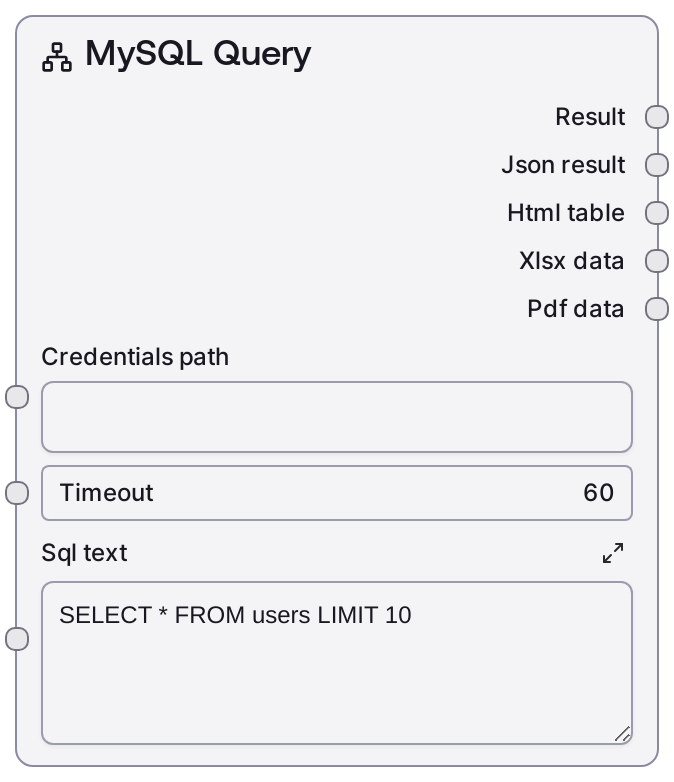
MySQL Query
This node runs a read-only SQL SELECT query against a MySQL database using configured credentials. It sends the provided SQL statement to a MySQL service endpoint, waits for the response, and formats the results into a human-readable summary along with a JSON payload. It is designed for data retrieval operations and returns data in a structure that downstream nodes can easily consume.
Usage
Use this node whenever you need to read data from a MySQL database as part of a Salt workflow—for example, fetching user profiles, retrieving analytics aggregates, or loading reference data for enrichment. It typically appears after a credentials/configuration step that provides a credentials_path (managed by Salt’s credential system) and before transformation, decision, or LLM nodes that consume the query results. Upstream, you might pair it with MySQL Test Connection to validate connectivity or with prompt/logic nodes that dynamically construct the sql_text. Downstream, nodes that summarize, transform, or route data can use the text output for human/LLM consumption and the JSON output for structured processing. A common pattern is: validate with MySQL Test Connection, explore schema with MySQL List Databases and MySQL List Tables, refine columns using MySQL Table Info or helper/query-builder nodes, then execute the final SELECT with MySQL Query to drive the rest of the pipeline.
| Field | Required | Type | Description | Example |
|---|
| timeout | True | INT | Maximum time in seconds to wait for the MySQL query service to respond. If the query or network call exceeds this duration, the node fails with a timeout-related error. Use larger values for complex analytical queries, but be aware of the impact on overall workflow latency. | 30 |
| sql_text | True | STRING | The SQL SELECT statement to execute against the configured MySQL database. Must be valid MySQL syntax and limited to a single read-only query (typically starting with SELECT). Multi-line SQL is allowed. Avoid INSERT, UPDATE, DELETE, or DDL statements; use the MySQL Execute node for those. | SELECT id, email, created_at FROM users WHERE created_at >= '2024-01-01' ORDER BY created_at DESC LIMIT 100 |
Outputs
| Field | Type | Description | Example |
|---|
| text_output | STRING | Human-readable summary of the MySQL query results. Usually includes row counts and a formatted preview of records, suitable for inspection by users or for consumption by LLM-focused nodes. | MySQL Query Results (2 rows):\n==================================================\nRow 1:\n id: 42\n email: alice@example.com\n created_at: 2024-03-01 09:15:23\n\nRow 2:\n id: 43\n email: bob@example.com\n created_at: 2024-03-01 09:16:10 |
| json_output | STRING | JSON-serialized representation of the raw query result returned by the MySQL service. Typically includes a data array of rows (each row as a key–value map) and optional metadata such as row_count. Downstream nodes should parse this string as JSON to work with structured data. | {"data": [{"id": 42, "email": "alice@example.com", "created_at": "2024-03-01T09:15:23"}, {"id": 43, "email": "bob@example.com", "created_at": "2024-03-01T09:16:10"}], "row_count": 2} |
Important Notes
- Performance: Complex joins, unindexed filters, or large table scans can cause slow responses and timeouts; add WHERE clauses, LIMIT, and proper indexing for production workflows.
- Limitations: This node is for read-only queries; using INSERT, UPDATE, DELETE, or DDL in sql_text is unsupported and may fail or be blocked—use MySQL Execute for mutations.
- Behavior: Connection details are loaded dynamically from credentials_path; changing or deleting the underlying credentials can break existing workflows until the path or credentials are updated.
- Behavior: The formatted text output may omit or summarize very large datasets for readability, while the JSON output is intended to carry the full machine-readable result set.
Troubleshooting
- Common Error 1: Authentication or connection errors (for example, "Access denied" or host unreachable) – confirm that credentials_path refers to a valid MySQL credential entry, the hostname and port are reachable, and the user has SELECT privileges on the target database.
- Common Error 2: Timeouts or very slow runs – raise the timeout value and/or optimize the SQL query by adding WHERE filters, LIMIT, and indexes. Avoid running large full-table scans inside time-sensitive workflows.
- Common Error 3: MySQL syntax errors – test the exact sql_text in a MySQL client, check for unescaped quotes, missing commas, or using reserved words as column names without quoting them.
- Common Error 4: Downstream parsing failures – remember that json_output is a JSON string; downstream logic or scripting nodes must parse it before iterating rows or accessing fields.