
Loop Nodes
Learn how to build Do While loops in Salt, wire the loop handles correctly, and avoid the common failure modes.
The Do While Loop node (SaltIfNodeSimpleLoop) is both a loop controller and a visual container for the nodes that run inside the loop body.
Unlike a traditional while loop, Salt's loop node behaves like a do-while:
- It runs the loop body once with the starting inputs.
- It evaluates
conditionafter that pass. - It repeats only while
conditionistrue.
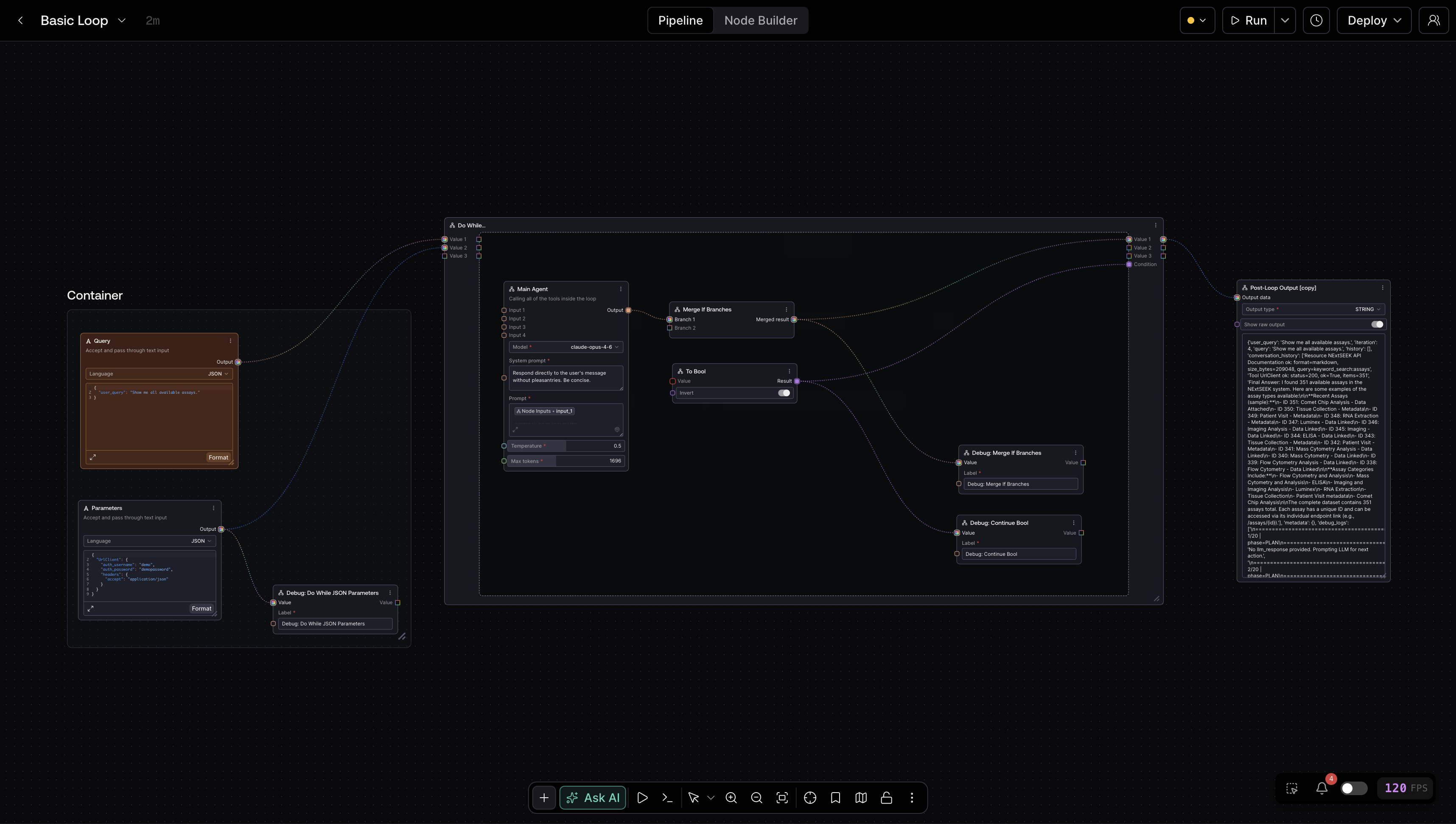
How the Loop Works
Think of the loop node as having two phases:
- Enter the loop with values from outside the loop.
- Feed updated values back into the loop for the next iteration.
The handle names matter:
open_value_1,open_value_2, ...: starting values from outside the loopvalue_1_true,value_2_true, ...: the current iteration values available inside the loop bodyclose_value_1,close_value_2, ...: updated values returned from inside the loop for the next iterationcondition: boolean that decides whether the loop continuesvalue_1_false,value_2_false, ...: the final values that leave the loop afterconditionbecomesfalse
In practice, the data path looks like this:
- outside node ->
open_value_1 - loop body reads
value_1_true - loop body writes the next iteration value to
close_value_1 - condition node writes
condition - post-loop nodes read
value_1_false
condition is evaluated after the first pass, but it still must be connected before Salt will run the pipeline.
Wiring Pattern
Use this wiring pattern every time:
- Add a Do While Loop node to the canvas.
- Drag the nodes you want to repeat inside the loop container.
- Feed your starting values into
open_value_*. - Connect
value_*_trueto the first nodes inside the loop body. - Connect the updated values from the loop body back into matching
close_value_*inputs. - Connect a boolean-producing node to
condition. - Connect
value_*_falseto the nodes that should run after the loop exits.
Minimal single-value loop
This is the essential shape of a working loop:
{
  "inputs": {
    "condition": ["20", 0],
    "open_value_1": ["14", 0],
    "close_value_1": ["19", 0]
  },
  "class_type": "SaltIfNodeSimpleLoop"
}
In that pattern:
- node
14provides the initial value - node
19produces the next iteration value - node
20decides whether to continue
Important Rules
These behaviors are enforced by the editor and execution engine:
- Only nodes outside the loop should feed
open_value_*. - Only nodes inside the loop should feed
close_value_*andcondition. value_*_truestays inside the loop body.value_*_falseis the loop exit path and should be used by downstream nodes outside the loop.- Nested loops are not supported.
- A loop without
conditionis blocked before execution.
Common Gotchas
Forgetting to return updated state
If you never connect close_value_1, the loop falls back to open_value_1 every iteration. That is sometimes useful, but in most cases it means your state never changes.
Sending the wrong branch downstream
Use value_*_false for post-loop work. value_*_true is the in-loop branch.
Using a condition that never changes
If your condition stays true forever, Salt will eventually stop the run. The execution engine starts monitoring loop state after 50 iterations and enforces a hard cap at 500 iterations.
Example Templates
These JSON files are exported pipeline workflows, not API prompt payloads. You can import them directly into the pipeline editor.
They use the current Text input node (SaltTextInput) rather than the legacy Salt Workflow Input node.
- Basic counter loop:
Text -> Primitive Value Converter -> Do While Loop, starts at10, decrements by1, and exits at0 - Multi-value loop: uses two
Textinputs, converts both to integers, and exits only after both counters reach0 - Long-running safe loop: uses the same Salt-only building blocks and runs 60 iterations to show that changing state is allowed even past the soft monitoring threshold
When to Use a Loop
Use a loop when you need one of these patterns:
- retry until a validator passes
- keep updating a value until it reaches a threshold
- maintain state across repeated agent or transformation steps
- iterate multiple related values together and exit only when the combined stop condition is met
If you only need branching, use a conditional node instead of a loop.